8 Best Typing Games for Kids: Fun Beginner Picks

 Discover a Free Education Video App for Kids
Pastory uses AI to personalize educational video content based on your child’s interests and personality. Safe, engaging, and built for curious young minds. Sign up now to stay updated and enjoy early access with a free trial
Learning to type is one of the most practical digital skills a child can develop, yet it rarely feels like a chore when the right game is involved. The best fun typing games for kids combine genuine keyboard practice with engaging themes — racing cars, space battles, jungle adventures — so children build muscle memory and proper finger placement without realizing they are doing structured work. This guide covers eight beginner-friendly picks organized by age and skill level, explains what to look for in a typing game, and gives parents the context they need to choose wisely.
Key Takeaways
- Most children are ready to begin structured typing practice around ages 6–7, when hand size and letter recognition are sufficiently developed; keyboard exploration can start earlier at ages 5–6.
- Free, browser-based typing games that require no login are the most accessible starting point for home and classroom use.
- Short, regular sessions — roughly 5 minutes for younger children and 10–15 minutes for ages 10 and up — are more effective than occasional long practice blocks.
- The biggest long-term benefit of starting early is preventing the hunt-and-peck habit, which is difficult to unlearn once it becomes automatic.
- Typing games work best as a complement to, not a replacement for, structured typing lessons that teach home row keys and correct finger placement.
When Are Children Ready to Start Typing?
Age-readiness for typing is shaped by three converging factors: hand size relative to a standard keyboard, letter recognition, and fine motor skills. Most children’s hands are not large enough to comfortably span the home row keys — A, S, D, F on the left and J, K, L, semicolon on the right — until around age 6 or 7. Before that point, keyboard exploration through simple letter-recognition games can build familiarity without demanding correct finger placement.
Between ages 7 and 9, most children have the motor control and reading ability to begin systematic touch typing practice. Touch typing means typing without looking at the keyboard, relying on muscle memory to locate each key. This is the skill that separates efficient typists from those who rely on the hunt-and-peck method — scanning the keyboard visually for each letter. Research in educational technology consistently shows that children who begin structured keyboarding skills practice before age 10 are significantly less likely to develop persistent hunt-and-peck habits.
By age 10 and beyond, children can work toward measurable typing speed and accuracy goals. A realistic benchmark for a child aged 6–8 with no formal training is roughly 5–10 words per minute (WPM). With structured practice, that range can rise to 10–20 WPM. Older children and preteens who practice consistently can reach 30–40 WPM or more, approaching adult beginner benchmarks.
What Makes a Typing Game Actually Useful?
Not every game labeled “educational” delivers meaningful keyboard skills development. The most effective fun typing games for kids share several characteristics worth checking before you recommend one to your child or class.
- Correct finger placement reinforcement: The best beginner typing games explicitly teach or reinforce home row positioning rather than allowing children to type however feels comfortable in the moment.
- Adjustable difficulty levels: A game that starts with single letters and gradually introduces full words, then sentences, supports natural skill progression without frustrating beginners.
- No login required: Browser-based typing games that children can access instantly remove barriers for both home and classroom use. Games requiring account creation can be a practical obstacle, especially in school settings.
- Progress tracking: Visible feedback on typing speed and accuracy helps children set goals and notice improvement over time, which supports motivation.
- Age-appropriate themes: A space shooter appeals to a different child than a jungle adventure. Matching the game’s theme to the child’s interests increases the likelihood of sustained practice.
- Short session design: Games structured around 5–15 minute rounds suit children’s attention spans and align with recommended screen time guidance for purposeful educational use.
8 Best Fun Typing Games for Kids
1. Dance Mat Typing (BBC)
Dance Mat Typing, produced by the BBC, is widely regarded as one of the most effective beginner typing games for children aged 6–10. The game is divided into twelve short lessons hosted by animated animal characters, each introducing a new row of keys in a logical sequence that begins with the home row. Children learn proper finger placement gradually, with each lesson building on the last. The game is entirely free, browser-based, and requires no login. One parent note worth mentioning: Dance Mat Typing uses British English spelling conventions, which may occasionally differ from what North American children encounter in school.
Best for: Ages 6–10 | Skill focus: Home row keys, finger placement, touch typing foundations | Access: Free, no login, browser-based
2. TypingClub
TypingClub is a structured online typing course that blends formal lessons with game-like activities, making it one of the most comprehensive free options available. It covers the full keyboard in a logical sequence, tracks progress across sessions, and includes visual feedback on typing speed and accuracy. TypingClub is widely used in elementary school classrooms because it aligns well with curriculum goals and offers a teacher dashboard for monitoring student progress. The platform does offer a paid tier with additional features, but the free version provides substantial content for beginner and intermediate learners. Children who find purely game-based formats insufficiently structured often respond well to TypingClub’s lesson-first approach.
Best for: Ages 7–12 | Skill focus: Full keyboard coverage, WPM tracking, structured lessons | Access: Free tier available, optional account for progress saving
3. Nitro Type
Nitro Type is a multiplayer racing game in which players compete by typing passages as quickly and accurately as possible — the faster you type, the faster your car moves. This format is highly motivating for children who respond to competition and visible performance metrics. Nitro Type builds typing speed and accuracy simultaneously, and the racing mechanic naturally encourages children to improve their WPM to keep up with opponents. It also reinforces spelling and vocabulary because players must type real words and sentences rather than random letter strings. A parent note: the competitive element can be discouraging for younger or slower typists who are consistently outpaced. Nitro Type is better suited to children who already have basic keyboard familiarity and are ready to push their speed.
Best for: Ages 8–14 | Skill focus: Typing speed, accuracy, hand-eye coordination | Access: Free, browser-based; optional account for progress tracking
4. Jungle Junior (Typing.com)
Jungle Junior is a free, interactive typing game designed specifically for Pre-K through first-grade students, making it one of the most age-appropriate options for the youngest keyboard learners. The game focuses on letter recognition and basic keyboard familiarity rather than speed, which is developmentally appropriate for children whose fine motor skills and reading ability are still developing. The jungle theme and simple mechanics keep young children engaged without overwhelming them. Jungle Junior is a strong first step before moving to more structured programs like Dance Mat Typing or TypingClub.
Best for: Ages 4–7 | Skill focus: Letter recognition, keyboard familiarity | Access: Free, browser-based, no login required
5. ZType
ZType is a fast-paced space shooter in which players destroy incoming enemy ships by typing the words displayed on them. As the game progresses, words become longer and appear more frequently, creating a natural difficulty curve that challenges children to type faster and more accurately under mild pressure. ZType is particularly effective for children who are already comfortable with basic keyboard layout and want to push their typing fluency. The game does not teach finger placement explicitly, so it works best as a speed-building supplement rather than a first introduction to touch typing. The space theme and arcade-style gameplay make it genuinely engaging for older children and preteens.
Best for: Ages 9–14 | Skill focus: Typing speed, word recognition, accuracy under pressure | Access: Free, browser-based, no login required
6. Keyboard Climber 2
Keyboard Climber 2 features a monkey that climbs higher with each correct letter typed, providing immediate visual feedback that young children find satisfying. The game focuses on individual letter recognition and basic keyboard layout, making it well suited to children in the early stages of keyboard exploration. The simple mechanic — type the letter shown, watch the monkey climb — removes complexity and lets children focus entirely on locating keys. Keyboard Climber 2 is a good choice for children aged 5–7 who are not yet ready for word-level typing games but need a gentle, engaging introduction to the keyboard.
Best for: Ages 5–7 | Skill focus: Letter recognition, keyboard layout familiarity | Access: Free, browser-based
7. TypeRacer
TypeRacer is one of the most widely used online typing speed games for older children, teens, and adults. Players type passages from books, movies, and songs to race virtual cars against other users or the computer. TypeRacer displays WPM and accuracy after each race, giving children clear, measurable feedback on their progress. The platform uses real text passages, which means children are simultaneously practicing typing fluency and encountering varied vocabulary. TypeRacer is best suited to children who have already developed basic touch typing skills and want a motivating environment to build speed. The multiplayer format can be competitive, so it is worth monitoring younger children’s emotional responses to losing races.
Best for: Ages 10 and up | Skill focus: Typing speed, accuracy, vocabulary exposure | Access: Free, browser-based; optional account for history tracking
8. Typing Rocket Jr. (ABCya)
Typing Rocket Jr., available through ABCya, presents falling rockets labeled with letters that children must type before they reach the ground. The game is simple, visually appealing, and well calibrated for early primary-age children who are just beginning to connect letter names with key locations. ABCya is a well-established educational platform used widely in elementary schools, and its games are generally free of intrusive advertising in classroom contexts. Typing Rocket Jr. does not teach formal finger placement, but it builds the letter-to-key association that underpins later touch typing development. It pairs well with Dance Mat Typing as a warm-up or supplementary activity.
Best for: Ages 5–8 | Skill focus: Letter-key association, keyboard familiarity, reaction time | Access: Free, browser-based
Recommended Learning Path by Age and Skill Level
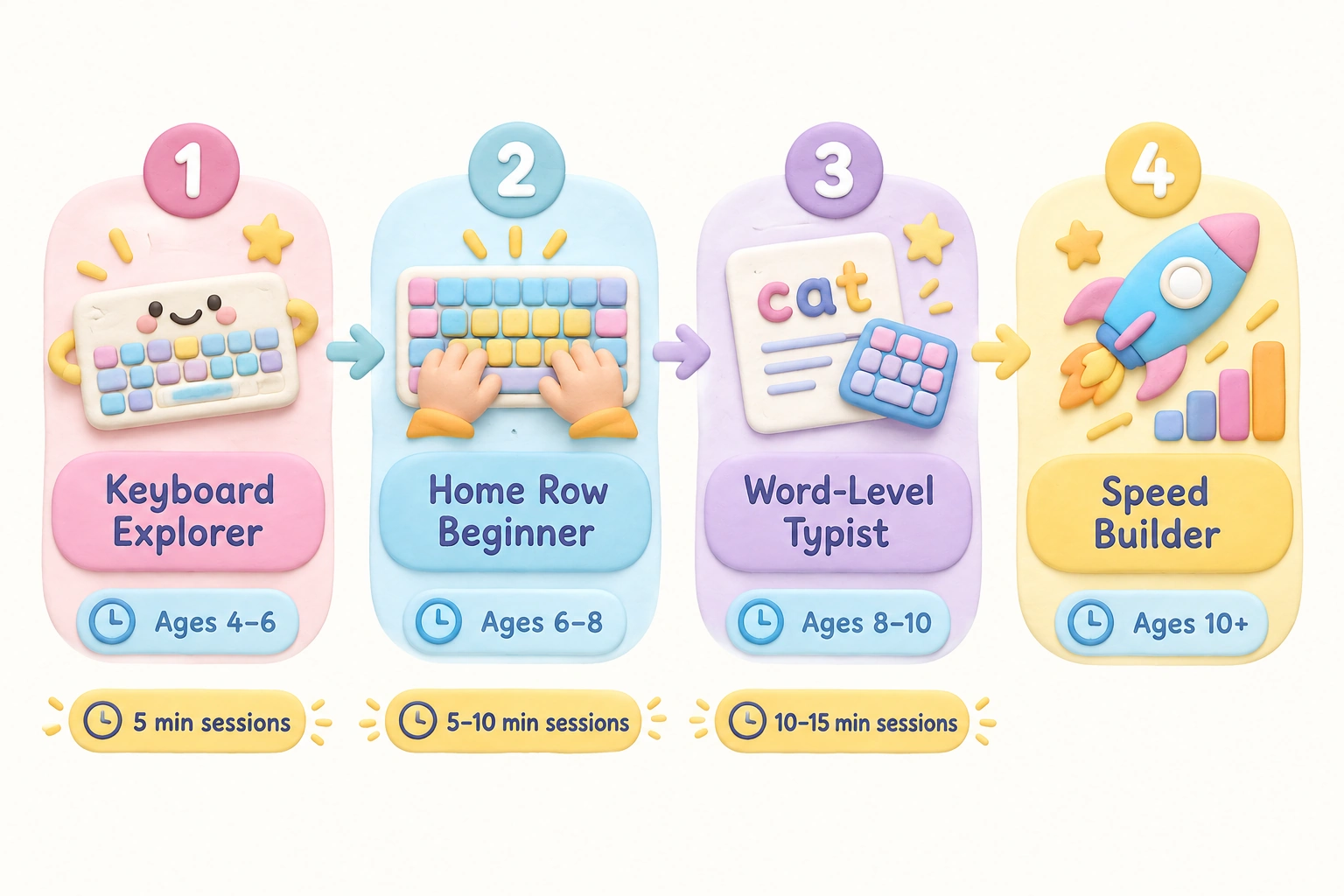
A structured progression helps children build keyboarding skills without skipping foundational steps. The table below outlines a practical learning path based on developmental readiness and the games covered in this article.
| Stage | Age Range | Focus | Recommended Games | Session Length |
|---|---|---|---|---|
| Keyboard Explorer | Ages 4–6 | Letter recognition, key location | Jungle Junior, Keyboard Climber 2, Typing Rocket Jr. | 5 minutes, 3–4×/week |
| Home Row Beginner | Ages 6–8 | Home row keys, finger placement, touch typing introduction | Dance Mat Typing, TypingClub (beginner levels) | 5–10 minutes, 4–5×/week |
| Word-Level Typist | Ages 8–10 | Full keyboard, word typing, basic speed | TypingClub (intermediate), ZType (early levels), Nitro Type | 10–15 minutes, 4–5×/week |
| Speed Builder | Ages 10+ | Typing speed, accuracy, fluency under pressure | Nitro Type, TypeRacer, ZType (advanced) | 10–15 minutes, 3–5×/week |
How to Prevent the Hunt-and-Peck Habit
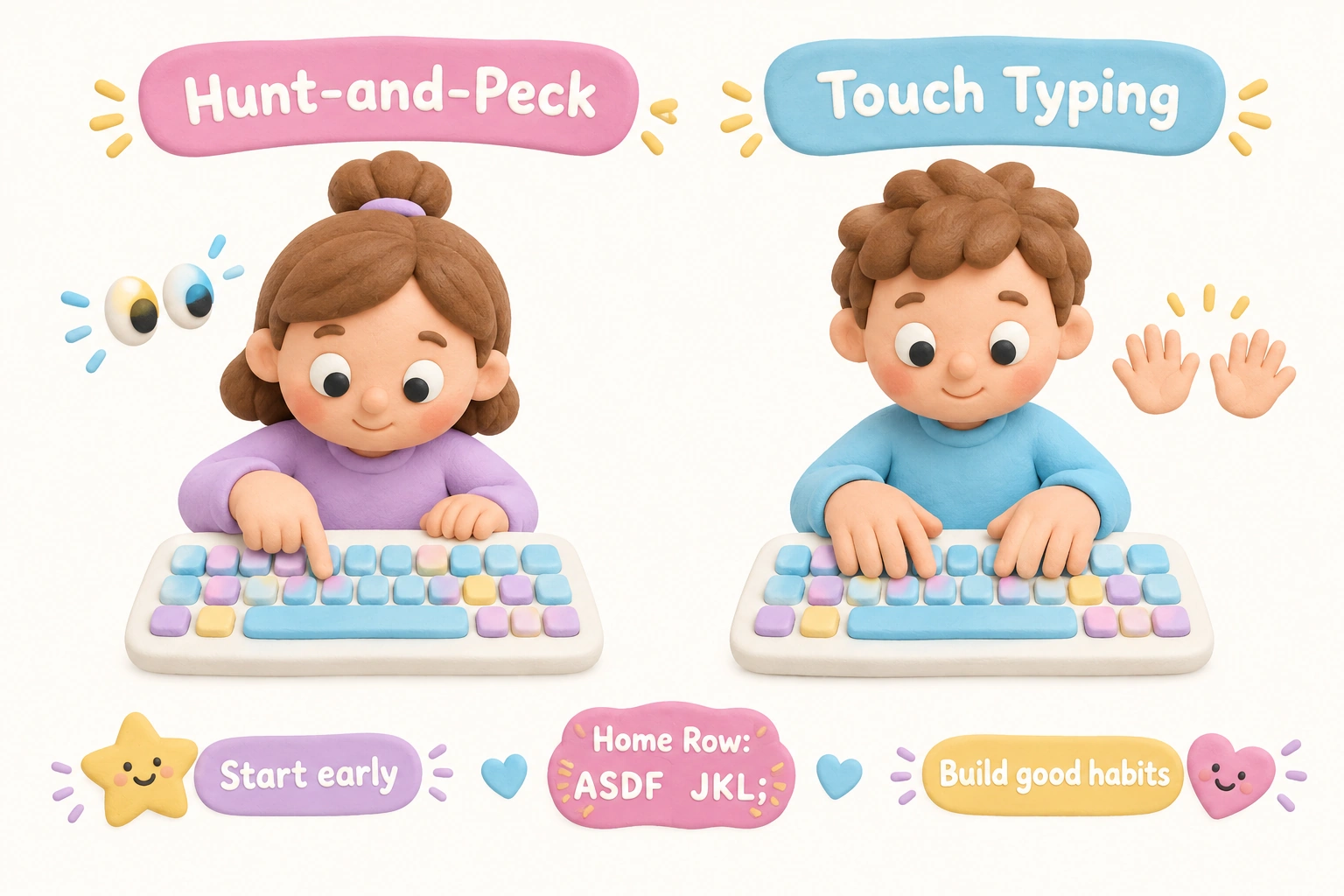
The hunt-and-peck method — scanning the keyboard visually to locate each key and typing with one or two fingers — is the most common bad habit that typing games can help prevent. The challenge is that hunt-and-peck feels efficient to children in the short term because it produces results without requiring deliberate practice. Once the habit is established, it is genuinely difficult to unlearn because the motor pathways become automatic.
Starting structured typing practice before age 8 significantly reduces the risk of hunt-and-peck becoming entrenched. Games that explicitly teach home row positioning, such as Dance Mat Typing and TypingClub, are more effective at preventing this habit than open-ended speed games that allow children to type however they choose. Parents and teachers can reinforce correct technique by occasionally observing a child’s hand position during practice and gently redirecting if they notice fingers drifting away from the home row.
It is also worth noting that some children will naturally resist the initial slowdown that comes with learning proper finger placement. Typing correctly feels slower at first because it requires conscious attention rather than automatic movement. Reassuring children that this temporary slowdown is normal — and that muscle memory will make correct technique feel natural within a few weeks of consistent practice — helps maintain motivation during the adjustment period.
Classroom vs. Home Use: What Parents and Teachers Should Know
Several of the games in this list are particularly well suited to classroom settings. Dance Mat Typing, TypingClub, Jungle Junior, and Typing Rocket Jr. are all free, require no student accounts, and contain no advertising that would be disruptive in a school environment. TypingClub additionally offers a teacher dashboard, making it one of the most practical options for educators who want to monitor individual student progress across a class.
For home use, the priority is usually engagement over structure. Children are more likely to practice voluntarily at home if the game genuinely interests them. Nitro Type and ZType tend to perform well in home settings because their competitive and arcade-style formats feel more like entertainment than schoolwork. Parents who want to ensure their child is also building correct technique alongside speed should pair these games with a structured program like Dance Mat Typing or TypingClub rather than relying on speed games alone.
One practical consideration for both settings is device compatibility. Most of the games listed here are designed for desktop and laptop computers with physical keyboards. Tablet and touchscreen use is generally not suitable for developing genuine touch typing skills, since the absence of tactile key feedback makes it difficult to build the muscle memory that underpins efficient typing. If a child primarily uses a tablet, connecting a physical keyboard is strongly recommended before beginning structured typing practice.
WPM Benchmarks by Age: Setting Realistic Expectations
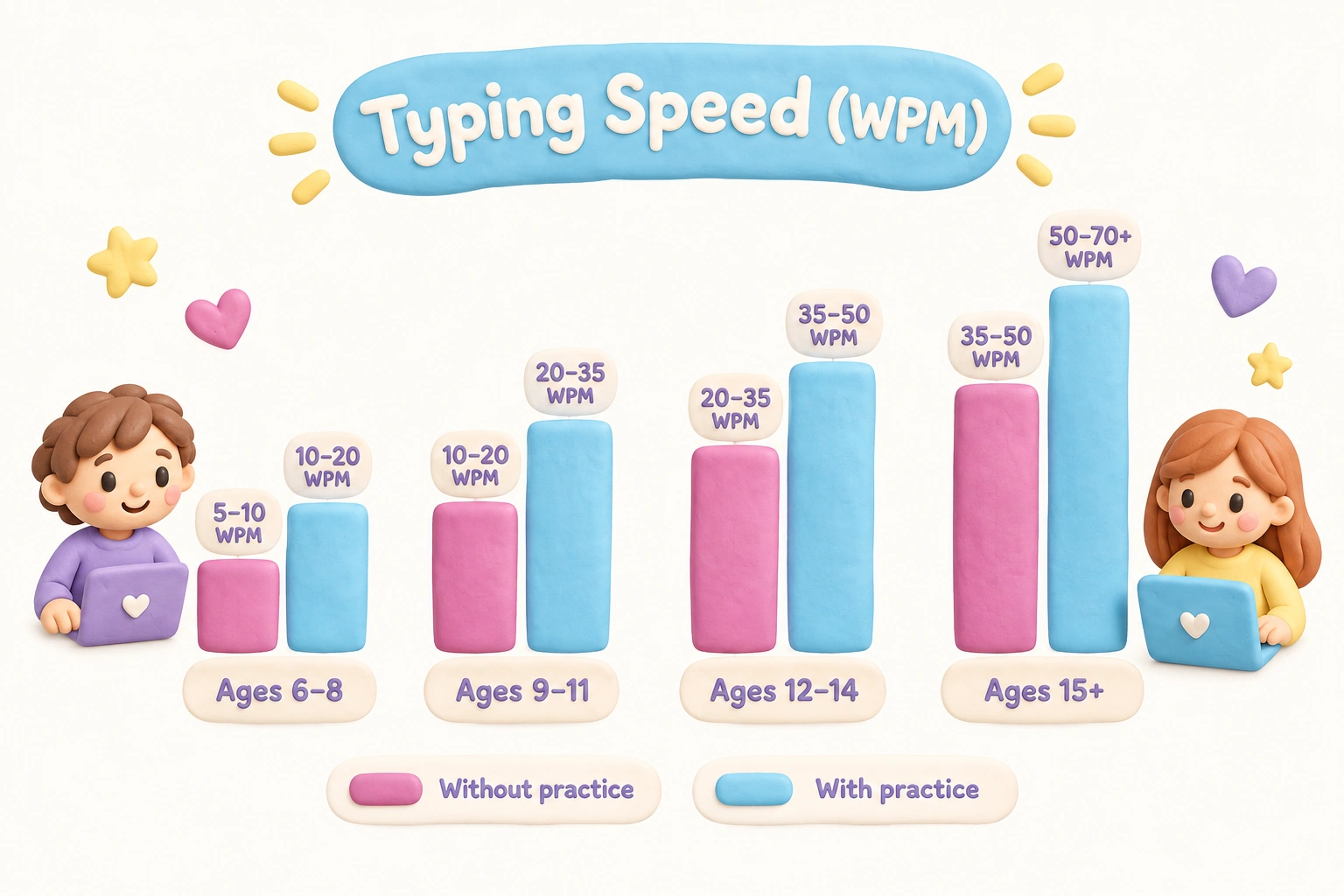
Parents sometimes worry when their child’s typing speed seems low compared to adult standards. The table below provides realistic WPM benchmarks by age group to help set appropriate expectations. These ranges reflect typical development and should not be treated as fixed targets, since individual variation is significant.
| Age Group | Without Formal Practice | With Regular Structured Practice |
|---|---|---|
| Ages 6–8 | 5–10 WPM | 10–20 WPM |
| Ages 9–11 | 10–20 WPM | 20–35 WPM |
| Ages 12–14 | 20–30 WPM | 35–50 WPM |
| Ages 15+ | 30–40 WPM | 50–70+ WPM |
Typing speed naturally increases with age even without formal instruction, simply because reading fluency, vocabulary, and fine motor coordination all improve over time. Structured practice accelerates this trajectory, but the most important outcome at the beginner stage is not speed — it is developing correct technique that will support faster, more accurate typing later.
Frequently Asked Questions
What age should children start learning to type?
Most children are developmentally ready for keyboard exploration around ages 5–6 and for structured touch typing practice around ages 6–7. Systematic learning of the full keyboard is generally most effective from ages 7–9, when letter recognition, fine motor skills, and hand size are sufficiently developed. Starting earlier with simple letter-recognition games is beneficial, but formal finger placement instruction before age 6 may be premature for many children.
Are free typing games as effective as paid programs?
Several of the most effective beginner typing games — including Dance Mat Typing, TypingClub’s free tier, and Jungle Junior — are entirely free. Paid programs may offer additional features such as detailed progress reports, curriculum alignment certificates, or ad-free environments, but the core skill-building content in free browser-based games is generally comparable for home and classroom use. The quality of the game’s instructional design matters more than its price.
Can typing games replace formal typing lessons?
Typing games are most effective as a complement to structured lessons rather than a complete replacement. Games build engagement, reinforce muscle memory, and motivate consistent practice, but they do not always teach correct finger placement systematically. Programs like Dance Mat Typing and TypingClub bridge this gap by combining lesson structure with game-like elements. Children who rely solely on speed games without foundational instruction may develop faster typing habits that still involve incorrect technique.
How long should a child practice typing each day?
Short, regular sessions are more effective than occasional long ones. For children aged 5–6, five minutes three to four times per week is a reasonable starting point. Children aged 7–9 can typically sustain 5–10 minutes per session, and children aged 10 and up can benefit from 10–15 minute sessions practiced four to five times per week. Consistency over weeks and months produces more durable skill development than intensive short-term practice.
Do typing games work on tablets?
Most typing games are designed for physical keyboards and do not translate well to touchscreen-only use. The tactile feedback of physical keys is important for developing the muscle memory that makes touch typing automatic. If a child uses a tablet as their primary device, connecting a Bluetooth or USB keyboard is strongly recommended before beginning structured typing practice. Some games may function on a tablet with an attached keyboard, but compatibility varies by platform.
Is competitive typing appropriate for young children?
Multiplayer and competitive typing games like Nitro Type and TypeRacer can be highly motivating for children who enjoy performance-based challenges. However, for younger children or those who are sensitive to comparison, the competitive format can be discouraging if they are consistently outpaced. It is worth observing how your child responds emotionally to losing races before making competitive games a regular part of their practice routine. Single-player or cooperative formats are generally a better fit for children under age 8.
Choosing the Right Typing Game for Your Child’s Stage
The eight games in this list cover a wide developmental range, from pre-readers exploring the keyboard for the first time to preteens pushing their typing speed toward adult benchmarks. The most important factor in choosing among them is matching the game’s instructional design to your child’s current skill level — not simply their age. A seven-year-old who has never used a keyboard benefits more from Dance Mat Typing’s structured home row lessons than from Nitro Type’s speed-focused racing format, even if the latter is more immediately exciting.
For parents and educators, the practical starting point is to identify whether a child needs foundational instruction (home row keys, finger placement, letter recognition) or skill reinforcement (speed, accuracy, fluency). Foundational learners should begin with Dance Mat Typing, TypingClub, or Jungle Junior. Children who have basic keyboard familiarity and want to build speed will find Nitro Type, ZType, and TypeRacer more engaging and appropriately challenging.
Whichever game you choose, the most reliable predictor of progress is consistent short-session practice over several weeks. Digital literacy and keyboarding skills develop gradually through repetition, and the games that make that repetition feel enjoyable are the ones most likely to produce lasting results. Starting early, keeping sessions brief, and prioritizing correct technique over raw speed gives children the strongest foundation for confident, efficient typing throughout their school years and beyond.
Take a short quiz to find out what your everyday choices say about your parenting style
When your child is curious about something new, what’s your instinct?
Take a short quiz to find out what your everyday choices say about your parenting style
“Can I download this app?” What happens next?
Take a short quiz to find out what your everyday choices say about your parenting style
When it comes to rules at home, which sounds most like you?
Take a short quiz to find out what your everyday choices say about your parenting style
If you could give your child one life skill today, what would you pick?
Take a short quiz to find out what your everyday choices say about your parenting style
Your child gets to choose what to watch. What would your ideal setup look like?
Take a short quiz to find out what your everyday choices say about your parenting style
Pick your parenting superpower ✨