
Why Parents Need More Control Over Digital Learning?
Children already spend significant time watching videos — but the content they encounter is shaped by platform algorithms designed for engagement, not learning. Parents often find it difficult to influence content quality, topic relevance or time balance in real time.
Pastory gives parents a practical way to build a purposeful video environment for their child. The app moves families from passive, algorithm-driven viewing toward a curated learning feed parents actively shape and manage.



What Is Pastory?
Pastory is an AI-powered educational app for parents who want meaningful control over children’s video learning. The app creates a curated learning feed inside its own environment using YouTube videos sourced through the YouTube API. Pastory does not modify a child’s YouTube account or change YouTube recommendations in any way.
Parents choose or generate curricula, add trusted YouTube channels, set viewing limits by category, and remove any video or playlist that does not meet family expectations. Children watch the curated content inside Pastory — not on YouTube directly.

Control What Your Child Watches Inside the App
Pastory gives parents direct control over the child’s content environment inside the app. This helps families create a safer video space without requiring constant supervision or blocking YouTube access entirely.
Key control features include:
can be added to the child’s feed, so video sources come from reliable educational creators
can be removed when content is unsuitable, off-topic or low quality
can be deleted from the child’s feed if they no longer match the learning goal
keeps children inside Pastory instead of sending them to YouTube
helps reduce random browsing and keeps videos aligned with parent-approved content
means children are not exposed to unrelated autoplay content, comment sections or recommendations outside the curated feed
allows families to use valuable educational videos without opening the full YouTube environment
Create Personalised Learning Paths With AI
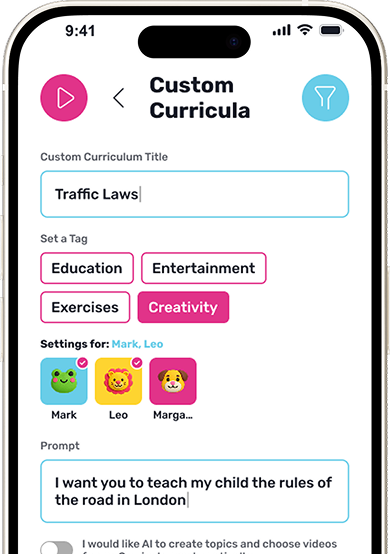
Parents can generate a custom curriculum by entering a short prompt describing a learning goal — a subject, hobby, skill or area of curiosity. Pastory’s AI creates a structured set of learning topics and selects relevant YouTube videos for each one.
This feature supports a wide range of use cases:
- Academic support in maths, science, history, or language
- Creative exploration in drawing, music, crafts, or storytelling
- Life skills such as cooking, budgeting, or nature awareness
- Emotional development and social understanding
- Curiosity-led discovery around a child's current interests
- Physical activity and exercise-based learning

Manage Screen Time by Learning Category
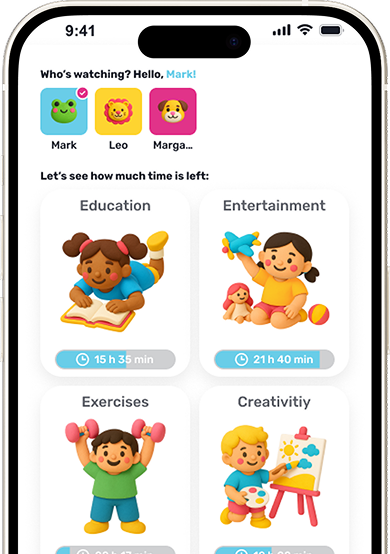
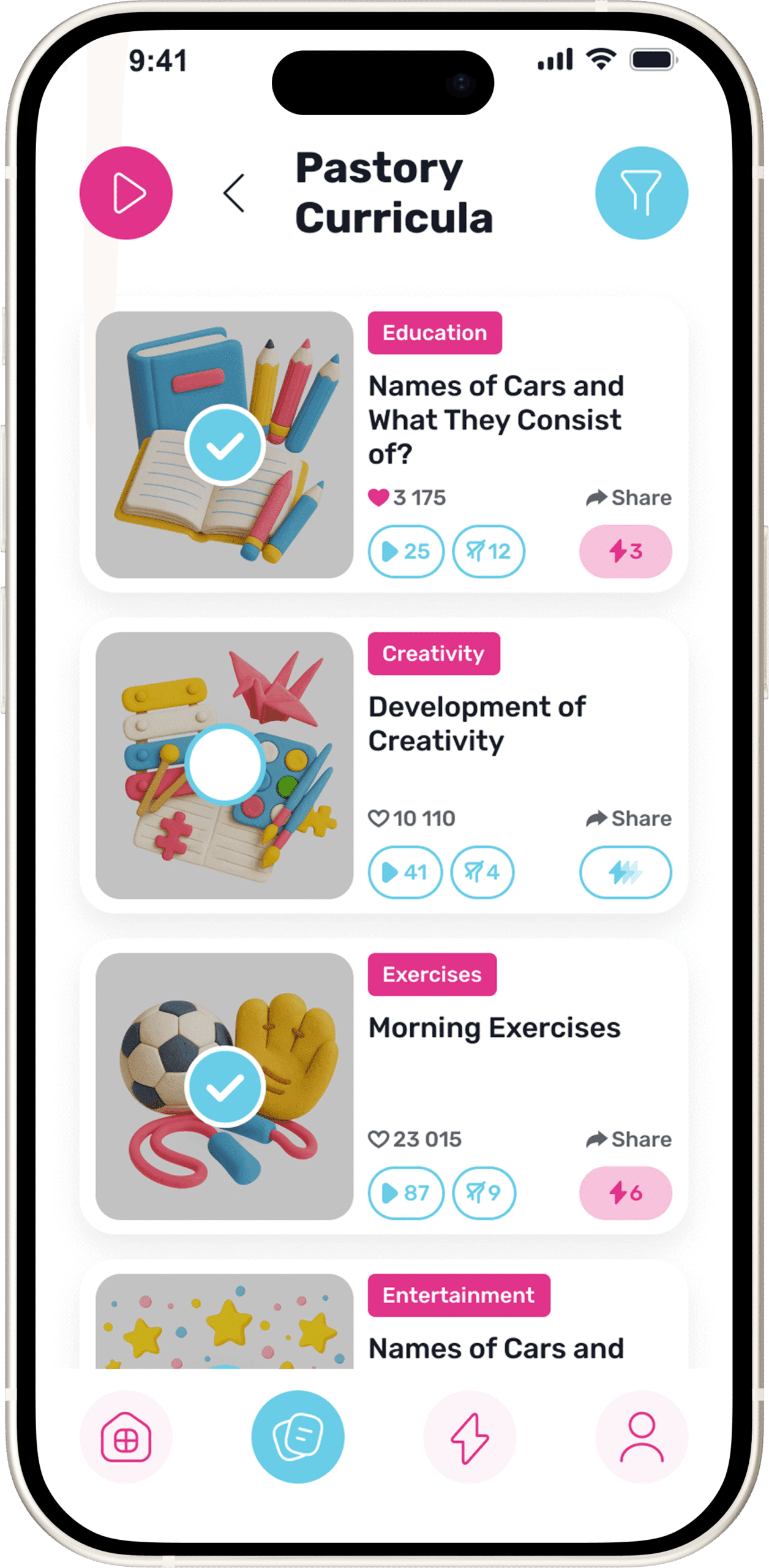
Pastory organises all content into four categories: Education, Entertainment, Exercise, and Creativity. Parents can set daily viewing time limits for each category independently, and limits can be configured separately for each child in the family.
- Education — academic subjects, school topics, and knowledge-building content
- Entertainment — age-appropriate video content balanced within the learning feed
- Exercise — physical activity, movement, and active learning videos
- Creativity — drawing, music, crafts, storytelling and imaginative projects
This structure allows families to support balanced screen time routines based on their own priorities rather than platform defaults.

Ready-Made Curriculums for Different Ages
Parents who prefer not to build a curriculum manually can choose from Pastory’s library of ready-made learning paths. These curriculums are organised by age group and cover academic subjects, early literacy, creativity, life skills, and social-emotional learning.
Ready-made curricula are suitable for parents who want a structured starting point — particularly useful for younger children or families new to guided video learning. Some curriculums may also align with school topics, supporting homework and subject revision at home.

Educational Areas Parents Can Support
Pastory supports maths, science, English, history and geography through curated video content. Video-based learning may support comprehension and memory retention when content matches the child’s current level and learning style

Creative content helps children explore drawing, music, crafts, storytelling and design. This type of learning supports self-expression and problem-solving alongside academic development

Pastory includes an Exercise category with movement-based and physical activity videos. Regular active breaks can support focus, mood and physical development alongside screen-based learning

Videos covering empathy, communication, confidence and emotions help children understand themselves and others. The American Psychological Association notes that social-emotional skills influence academic performance, behaviour and long-term wellbeing
Practical content about daily habits, nature, responsibility and global awareness connects learning with real-world situations. Curiosity-led topics help children build independent learning habits that extend beyond structured subjects
Pastory vs Regular YouTube Watching
How Pastory Works
Choose a ready-made curriculum or create one with AI
Add trusted channels if needed
Set viewing limits by category
The child watches curated videos inside Pastory
Helpful Parenting Tips

Frequently Asked Questions
What is an educational app for parents?
An educational app for parents helps families guide what children learn through digital content. Pastory gives parents tools to build a curated YouTube learning feed inside the app — including ready-made curriculums, AI-generated learning paths, channel controls and category-based screen time limits.
Does Pastory change my child's YouTube feed?
No. Pastory does not modify a child’s YouTube account or influence YouTube recommendations. The app creates a separate curated learning feed inside Pastory using videos sourced through the YouTube API. Children watch selected content inside the app, not on YouTube directly.
How does Pastory create a learning feed?
Pastory builds a learning feed by matching selected YouTube videos to a chosen curriculum. Parents can select a ready-made curriculum or generate a custom one using AI by entering a short prompt. Trusted YouTube channels can also be added, and specific videos or playlists can be removed at any time.
Can parents create their own curriculum?
Yes. Parents can use Pastory’s AI to generate a custom curriculum by entering a short description of a learning goal. The app creates a structured set of topics and selects relevant YouTube videos — suitable for academic support, hobbies, creative exploration or any area of curiosity.
Can I control how much my child watches?
Yes. Pastory allows parents to set daily viewing time limits for each of the four content categories: Education, Entertainment, Exercise and Creativity. Limits can be configured separately for each child, giving families flexible control over how video time is distributed.
What are the Education, Entertainment, Exercise and Creativity categories?
These are the four content categories Pastory uses to organise all videos in the app. Education covers academic and knowledge-building content. Entertainment includes age-appropriate video balanced within the feed. Exercise covers physical activity and movement videos. Creativity includes drawing, music, crafts and storytelling. Parents set individual time limits for each category per child.
Can I remove videos or playlists from my child's feed?
Yes. Parents can remove specific videos or playlists from the child’s feed inside the app at any time. Trusted YouTube channels can also be added to ensure content comes from reliable educational sources — giving parents ongoing control without requiring constant supervision.
Is Pastory free to download?
Pastory is available to download and try for free. Core features are accessible at no cost, with additional resources and learning tools available through the full version. Parents can explore what the app includes before making any purchase decision.
Does Pastory work across different devices?
Pastory is designed to work across mobile phones, tablets and the web, giving families flexible access to curated educational content across the devices children already use at home.
