12 Best Games to Use with Google Classroom: Free Learning Tools

 Discover a Free Education Video App for Kids
Pastory uses AI to personalize educational video content based on your child’s interests and personality. Safe, engaging, and built for curious young minds. Sign up now to stay updated and enjoy early access with a free trial
Game-based learning has moved well beyond novelty status in K–12 classrooms. A growing body of research suggests that gamified learning environments can increase intrinsic motivation, improve knowledge retention, and re-engage reluctant learners who disengage during traditional instruction. For teachers already using Google Classroom, the practical question is not whether to use games, but which tools integrate smoothly, which are genuinely free, and which are worth the time to set up. This guide reviews 12 of the best Google Classroom games available, with honest notes on free-tier limits, grade-level fit, and how to assign each one.
Key Takeaways
- Most popular game-based learning platforms offer a free tier, but free plans often cap player counts, question banks, or advanced features — knowing the exact limits helps you plan lessons without surprises.
- Not every tool integrates directly with Google Classroom’s LMS; some require sharing a join code or link manually rather than syncing rosters or grades automatically.
- The best tool for your class depends on subject area, grade band, whether you need live quiz games or self-paced homework assignments, and whether students need individual accounts.
- Quizizz has rebranded to Wayground — school network filters may need updating if the old domain is blocked.
- Combining two or three complementary tools (for example, a live quiz game for review and a self-paced math game for practice) tends to produce better engagement than relying on a single platform.
What Are Google Classroom Games?
Google Classroom games are interactive learning tools that teachers assign or share through Google Classroom, either as links posted in the Stream or Classwork tab, or through a native Google Classroom integration via the Google Workspace Marketplace. The term covers a wide range of formats: live quiz games played simultaneously by the whole class, self-paced review games students complete as homework, curriculum-aligned math or vocabulary games with adaptive difficulty, and creative gamified lesson builders. What they share is the ability to make formative assessment and content practice feel less like a test and more like play, which research consistently links to higher student engagement and lower assessment anxiety.
It is worth distinguishing between tools that offer true Google Classroom integration — meaning roster sync, grade passback to the gradebook, and assignment creation from within Google Classroom — and tools that simply work well alongside Google Classroom by sharing a link or game code. Both approaches are useful, but the distinction matters for teachers who want automatic grading or progress reports without manual data entry.
At a Glance: 12 Google Classroom Games Compared
| Tool | Best For | Free Tier Limit | Grade Band | GC Integration | Student Login? |
|---|---|---|---|---|---|
| Kahoot! | Live whole-class review | 10 players (live) | K–12 | Link/code | Optional |
| Wayground (Quizizz) | Self-paced quizzes & homework | Unlimited players, basic features | K–12 | Native add-on | Optional |
| Blooket | Engaging review games | Unlimited players, limited sets | 3–12 | Link/code only | Required |
| Gimkit | Strategic in-game currency play | 5 players (live Kit) | 5–12 | Link/code | Required |
| Nearpod | Interactive lessons with embedded games | 40 students/session, 300 MB storage | K–12 | Native add-on | Join code |
| Prodigy Math | Adaptive math practice | Full game, limited teacher controls | 1–8 | Link/roster | Required |
| Classcraft | RPG-style classroom management + learning | Limited quests | 3–12 | Google SSO | Required |
| Wordwall | Vocabulary & spelling games | 5 interactive activities | K–12 | Link | No |
| Genially | Gamified interactive slides | Unlimited views, limited creations | K–12 | Link | No |
| Breakout EDU | Collaborative puzzle challenges | Free digital games available | 3–12 | Link | Optional |
| Legends of Learning | Curriculum-aligned science games | Limited game access | 3–8 | Native add-on | Required |
| Boddle Learning | Adaptive math for early grades | Basic reports, limited content | K–5 | Link/roster | Required |
The 12 Best Google Classroom Games Reviewed
1. Kahoot! — Best for Live Quiz Games and Whole-Class Engagement
Kahoot! remains one of the most recognizable live quiz game platforms in K–12 education. Teachers create a quiz, share the game code or a direct link via Google Classroom, and students join on any browser-based device — no download needed, and no student login required for guest play. The competitive live leaderboard and upbeat music make Kahoot! particularly effective as an end-of-unit review or warm-up activity. The free plan supports up to 10 players in a live game, which is a meaningful limitation for full-sized classes; teachers with larger groups will need a paid plan or can use Kahoot!’s self-paced mode, which has a higher player cap on the free tier. Kahoot! is Chromebook-compatible and works well across grade bands K–12, though younger students (K–2) may need support reading questions quickly under the timer.
How to assign in Google Classroom: Create your Kahoot, copy the game PIN or challenge link, and post it as a Material or Assignment in the Classwork tab. For self-paced challenges, students can complete the quiz as homework without a live session.
2. Wayground (formerly Quizizz) — Best for Self-Paced Homework and Formative Assessment
Quizizz has rebranded to Wayground, and the platform has moved to wayground.com. This is an important practical note: if your school network filter blocks the old quizizz.com domain or has not yet whitelisted wayground.com, students may be unable to access assignments. Wayground offers one of the most generous free tiers among quiz platforms — unlimited players, a large question library, and both live quiz game and self-paced modes at no cost. The native Google Classroom integration allows teachers to push assignments directly from Wayground, and basic student progress tracking is available on the free plan. Grade passback to the Google Classroom gradebook is available on paid plans. Wayground is browser-based and Chromebook-compatible, and students can join without creating an account using a join code.
How to assign in Google Classroom: Use the Wayground Google Classroom add-on from the Google Workspace Marketplace, or copy the assignment link and post it in Classwork. Students click the link and enter a join code or log in with Google.
3. Blooket — Best for High-Energy Review Games with Older Students
Blooket stands out for its variety of game modes — Tower Defense, Gold Quest, Café, and others — which wrap quiz questions inside genuinely engaging mini-game formats. This variety helps sustain student engagement across repeated review sessions better than a single game format can. However, teachers should be aware of an important limitation that competitors often gloss over: Blooket does not offer direct Google Classroom LMS integration. There is no roster sync or grade passback. Teachers share a game code or link manually, and student progress reports must be viewed inside Blooket’s own dashboard rather than in the Google Classroom gradebook. Students are required to create a Blooket account, which may be a consideration for younger grades or privacy-conscious districts. Blooket is best suited for grades 3–12 and works well on Chromebooks.
How to assign in Google Classroom: Host a live game and share the join code via the Google Classroom Stream, or create a homework assignment in Blooket and share the link in the Classwork tab. Grade data must be exported manually from Blooket.
4. Gimkit — Best for Strategic Thinking and Older Learners
Gimkit differentiates itself through an in-game currency mechanic: students earn virtual money by answering questions correctly and can spend it on power-ups that affect gameplay. This layer of strategy makes Gimkit particularly engaging for students in grades 5–12 who enjoy a more complex game loop than a straightforward quiz leaderboard. The free tier is notably restrictive for live games — only 5 students can join a live Kit on the free plan — making it impractical for most full classes without a paid subscription. Gimkit does not offer native Google Classroom grade passback; teachers share a join code or link. The platform is browser-based and Chromebook-compatible, and students need an account to track their progress and in-game currency.
How to assign in Google Classroom: Create a Kit, start a game or set it to self-paced mode, copy the join link, and post it in Google Classroom. For homework use, the self-paced mode has a higher free-tier player cap than live games.
5. Nearpod — Best for Interactive Lessons with Embedded Formative Assessment
Nearpod is less a standalone game and more a full interactive lesson platform that includes gamified elements such as Time to Climb (a competitive quiz game), Draw It activities, and collaborative boards. The free tier allows up to 40 students per session and 300 MB of storage — enough for many classroom uses, though storage fills quickly if teachers upload media-heavy lessons. Nearpod offers a native Google Classroom add-on, making it straightforward to push lessons directly to students. Student progress tracking and basic reports are available on the free plan. Nearpod works on Chromebooks and does not require students to download anything; they join via a join code in any browser. It is suitable for K–12 and is particularly strong for blended learning and remote or hybrid learning contexts where teachers want to combine instruction with interactive learning tools in a single session.
How to assign in Google Classroom: Install the Nearpod add-on from the Google Workspace Marketplace, then launch a lesson and share it directly to your Google Classroom class. Students receive the link in their Classwork feed.
6. Prodigy Math — Best for Adaptive Math Practice in Grades 1–8
Prodigy Math is an RPG-style math game where students battle monsters by answering curriculum-aligned math questions. The game adapts question difficulty based on student performance, which may support differentiated instruction without requiring the teacher to manually assign different content to different students. The free version gives students full access to the game, but teacher controls — including the ability to assign specific skills, view detailed progress reports, or set goals — are limited on the free plan and require a paid school or teacher subscription. Parents should note that Prodigy also markets a paid membership directly to families, which unlocks cosmetic in-game items but does not affect the math content students receive. Prodigy Math is best suited for grades 1–8, is browser-based and Chromebook-compatible, and requires student accounts.
How to assign in Google Classroom: Share the Prodigy class join link via Google Classroom. Students create accounts and join your class. Detailed skill assignment requires a teacher premium account.
7. Classcraft — Best for RPG-Style Classroom Management Across Grades 3–12
Classcraft gamifies the entire classroom experience rather than individual lessons. Students create RPG-style characters, earn experience points for positive behaviors and academic achievements, and can lose health points for rule violations — a mechanic that some educators find motivating and others find controversial. Classcraft supports Google Single Sign-On, making account creation straightforward for schools using Google Workspace for Education. The free tier includes basic character creation and behavior tracking but limits the number of quests and boss battles available. Classcraft is best suited for grades 3–12 and works particularly well for teachers who want to sustain student motivation across a full semester rather than just during individual review sessions.
How to assign in Google Classroom: Students sign in with their Google accounts. Teachers can post quest links or announcements in Google Classroom to direct students to specific Classcraft activities.
8. Wordwall — Best for Vocabulary and Spelling Games Across All Grade Levels
Wordwall allows teachers to create interactive vocabulary games, spelling activities, matching exercises, and quizzes using their own content. A single set of words or questions can be converted into multiple game formats — Match Up, Anagram, Wordsearch, Quiz, and others — with one click, which saves significant preparation time. The free plan limits teachers to five interactive activities, which is a meaningful cap for regular use. Wordwall does not require students to create accounts or download anything; they access activities via a shared link, making it one of the most privacy-friendly options on this list. It is Chromebook-compatible and suitable for K–12, with particular strength in ELA, language learning, and ESL/EFL contexts. There is no native Google Classroom integration or grade passback.
How to assign in Google Classroom: Copy the activity link from Wordwall and post it as a Material or Assignment in Google Classroom. Results are visible in the Wordwall teacher dashboard only.
9. Genially — Best for Gamified Interactive Slides and Escape Room Lessons
Genially is a presentation and interactive content builder that teachers use to create gamified lessons, escape room challenges, and interactive slides with embedded quizzes, hotspots, and animations. Unlike quiz-first platforms, Genially puts the teacher in full creative control of the game structure, which makes it highly flexible but also more time-intensive to set up. The free plan allows unlimited views of published content and a limited number of creations. Students access Genially content via a shared link — no student account or download is required — and the platform is browser-based and Chromebook-compatible. Genially does not offer grade passback or roster sync with Google Classroom. It is best suited for teachers comfortable with content creation who want to build unique gamified experiences beyond what template-based quiz tools offer.
How to assign in Google Classroom: Publish your Genially, copy the share link, and post it in the Google Classroom Classwork tab as a Material or Assignment.
10. Breakout EDU — Best for Collaborative Problem-Solving and Team-Based Games
Breakout EDU adapts the escape room concept for classrooms: students work in teams to solve a series of puzzles and unlock a virtual or physical box. The digital version is browser-based, requires no download, and is Chromebook-compatible. A library of free digital games is available, covering subjects from math and science to social studies and ELA across grades 3–12. Breakout EDU is particularly effective for developing collaborative skills, critical thinking, and persistence — competencies that standard quiz games do not directly target. There is no native Google Classroom integration or grade passback; teachers share a game link and observe team progress during the session. Student accounts are optional for most free digital games.
How to assign in Google Classroom: Find a free digital game on the Breakout EDU platform, copy the game link, and share it in Google Classroom. Assign students to teams before the session begins.
11. Legends of Learning — Best for Curriculum-Aligned Science Games in Grades 3–8
Legends of Learning offers a library of curriculum-aligned science games mapped to specific learning standards, making it one of the few platforms on this list designed explicitly for science instruction rather than general quiz review. Teachers assign playlists of games tied to specific topics — ecosystems, forces and motion, earth science — and students play through them at their own pace. The free tier provides limited access to the game library; full access requires a paid subscription. Legends of Learning offers a native Google Classroom add-on, and basic student progress tracking is available. The platform is browser-based and Chromebook-compatible, and students need accounts to save progress. It is best suited for grades 3–8.
How to assign in Google Classroom: Use the Legends of Learning Google Classroom add-on to push playlists directly to your class, or share assignment links in the Classwork tab.
12. Boddle Learning — Best for Adaptive Math in Early Elementary (K–5)
Boddle Learning is an adaptive math game platform designed specifically for younger learners in kindergarten through grade 5. Students answer math questions to earn coins used to customize their in-game avatar, which provides a motivating reward loop appropriate for early elementary age groups. The platform adapts question difficulty based on student performance and provides teachers with basic progress reports on the free plan. Boddle Learning supports Google Classroom roster import, making class setup straightforward. Full reporting features and additional content require a paid plan. The platform is browser-based and Chromebook-compatible, and students need accounts. Boddle is particularly well-suited for supporting reluctant learners in early math who benefit from a low-pressure, visually engaging practice environment.
How to assign in Google Classroom: Import your Google Classroom roster into Boddle, assign specific skills or let the platform adapt automatically, and share the student login link via Google Classroom.
How to Choose the Right Game for Your Classroom
Selecting the most effective Google Classroom game depends on several practical factors that go beyond which platform has the most features. The first consideration is your instructional goal: a live quiz game like Kahoot! or Wayground works well for end-of-unit review or warm-up activities, while a self-paced adaptive platform like Prodigy Math or Boddle Learning is better suited for ongoing independent practice and differentiated instruction. If your goal is collaborative problem-solving rather than individual assessment, Breakout EDU or Classcraft may be more appropriate than a competitive leaderboard game.
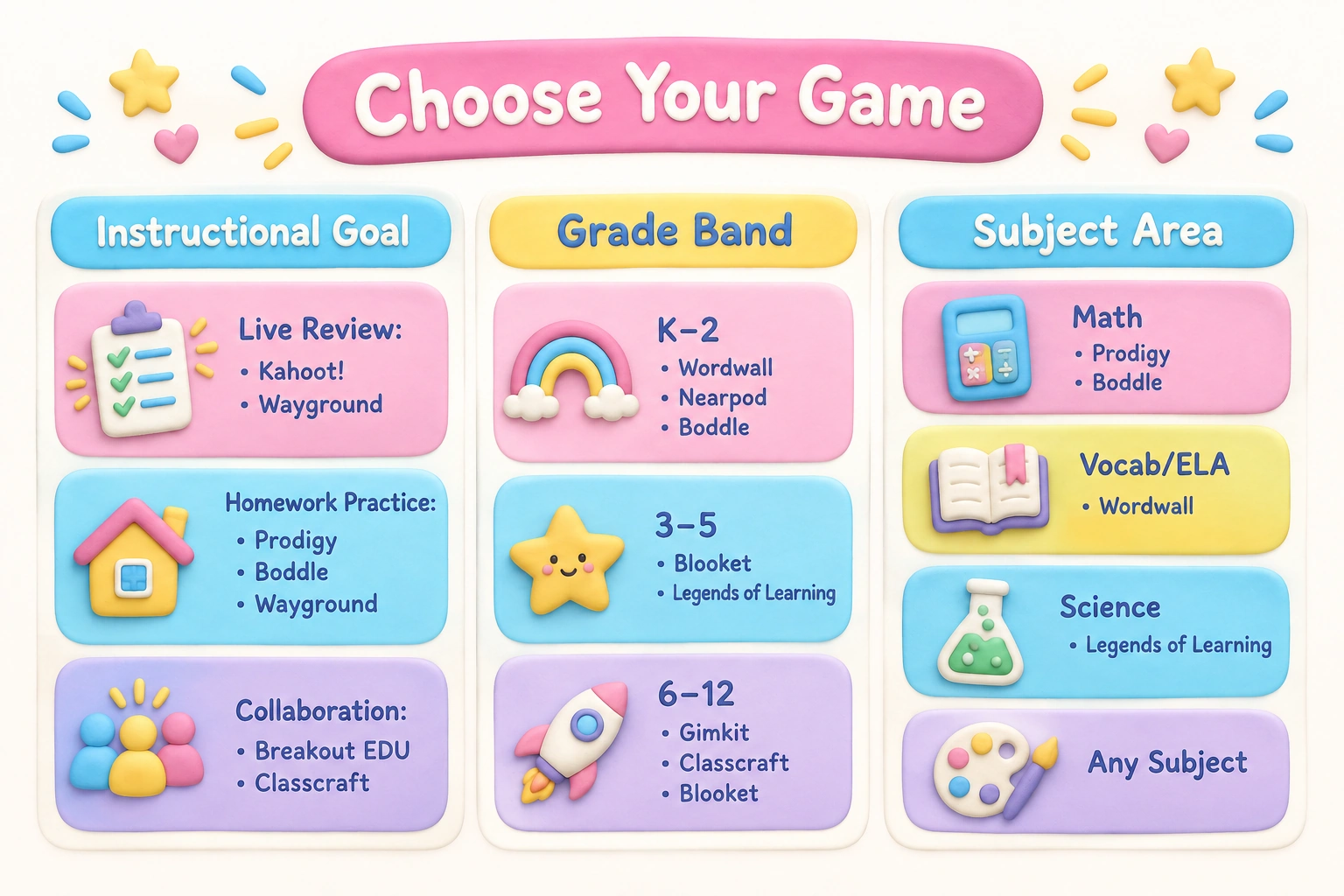
Grade level matters significantly. Younger students in K–2 benefit from tools with simple interfaces, no required student login, and shorter session lengths — Wordwall and Nearpod tend to work well here. Students in grades 5–12 can engage with more complex game mechanics, strategic thinking layers, and longer play sessions, making Gimkit, Blooket, and Classcraft better fits. Subject area is another filter: Legends of Learning is purpose-built for science, Prodigy Math and Boddle are math-specific, and Wordwall excels for vocabulary and language work, while Kahoot!, Wayground, and Blooket are subject-agnostic and work across the curriculum.
Finally, consider your technical context. If your school network has strict content filters, confirm that the platform’s domain is whitelisted — this is especially relevant for Wayground following the Quizizz rebrand. If student data privacy is a priority, prefer tools that allow guest access without student accounts, such as Kahoot! (guest mode), Wordwall, Nearpod (join code), and Genially.
Free vs. Paid: What You Actually Get
Most platforms on this list use a freemium model, and the gap between free and paid tiers varies considerably. Wayground’s free plan is among the most generous, offering unlimited players and both live and self-paced modes without a paywall. Nearpod’s free tier is functional for most classroom sizes at 40 students per session, though storage limits can become an issue over time. Kahoot!’s 10-player live game cap is the most restrictive on this list for classroom use, though the self-paced challenge mode has a higher free cap. Gimkit’s 5-player live limit makes the free plan impractical for whole-class live games.
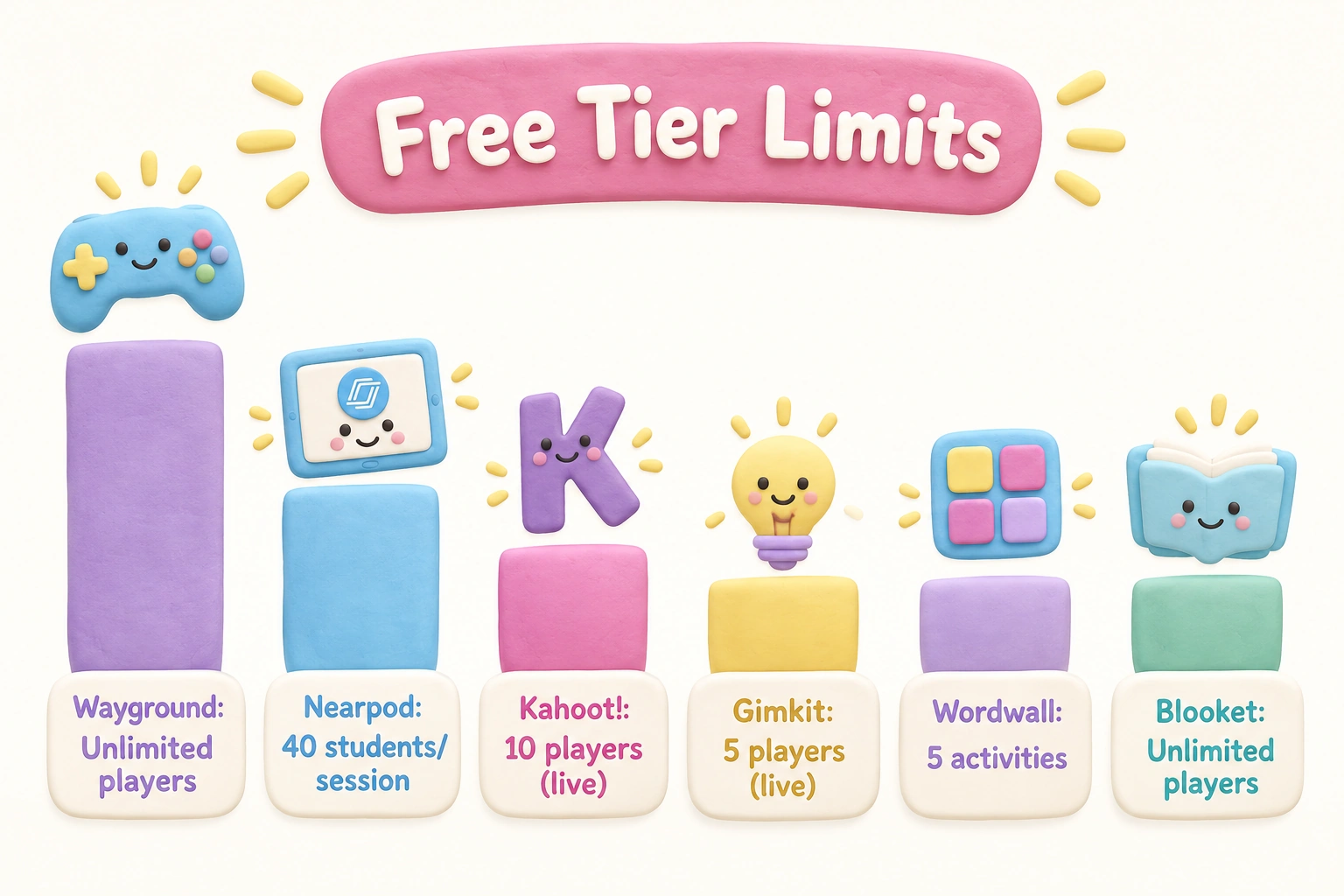
Grade passback to the Google Classroom gradebook is almost universally a paid feature. If automatic gradebook sync is important to your workflow, budget for at least one platform’s paid plan rather than expecting free tiers to deliver it. For teachers who primarily need student engagement and informal formative assessment rather than automatic grading, the free tiers of Wayground, Nearpod, Blooket, and Wordwall are genuinely useful without payment.
Remote, Hybrid, and Asynchronous Use
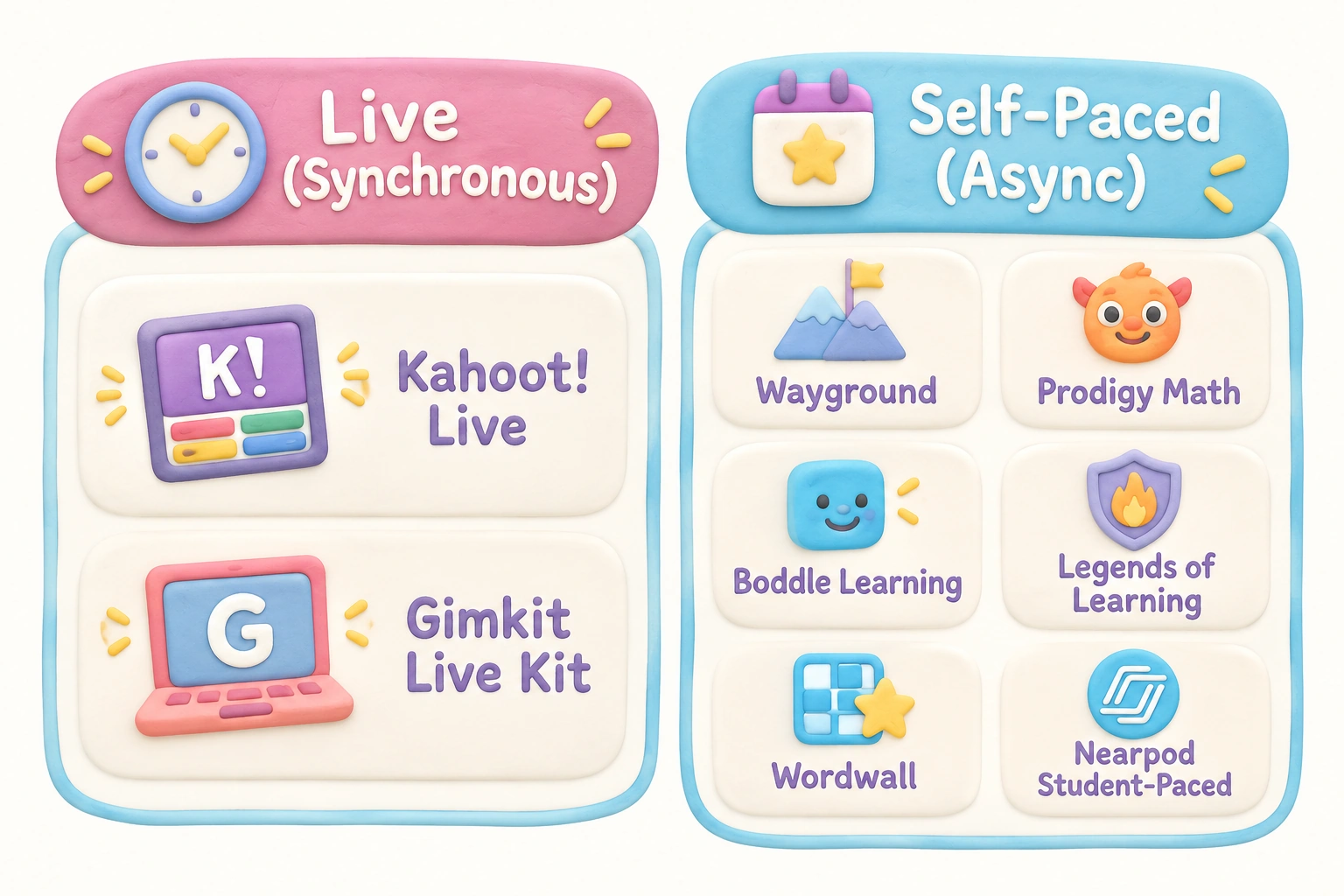
Not all Google Classroom games work equally well outside a live classroom setting. Live quiz games — Kahoot! in live mode, Gimkit’s live Kit — require synchronous participation and are less suitable for homework or asynchronous learning. Self-paced tools are better for remote or hybrid contexts: Wayground’s self-paced mode, Prodigy Math, Boddle Learning, Legends of Learning, and Wordwall all allow students to complete activities independently at their own pace and on their own schedule. Nearpod’s student-paced mode also supports asynchronous delivery of interactive lessons. When assigning games as homework, confirm that the platform works on the devices students have at home, not just on school Chromebooks, and that any required student accounts can be created without a school email if students use personal devices.
Frequently Asked Questions
Are these Google Classroom games free?
All 12 tools on this list offer a free tier or free access to at least some content. However, free plans vary significantly in what they include. Some cap the number of live players (Kahoot! at 10, Gimkit at 5), others limit content creation (Wordwall at 5 activities), and most reserve grade passback and advanced reporting for paid plans. Review the free-tier details for each tool before planning a lesson that depends on a specific feature.
Do students need to create accounts to use these games?
It depends on the platform. Kahoot! (guest mode), Wordwall, Nearpod (join code), Genially, and Breakout EDU (most digital games) do not require student accounts. Blooket, Gimkit, Prodigy Math, Classcraft, Legends of Learning, and Boddle Learning all require student accounts. Wayground allows students to join as guests with a join code for live games, though accounts are needed to save progress.
Do these tools work on Chromebooks?
Yes — all 12 tools reviewed here are browser-based and Chromebook-compatible. None require a software download. Students can access them through any modern web browser on a school Chromebook, tablet, or home computer.
Which tools offer true Google Classroom integration with grade passback?
Wayground (Quizizz) offers a native Google Classroom add-on with grade passback on paid plans. Nearpod and Legends of Learning also offer native add-ons. Most other tools on this list — including Blooket, Kahoot!, Gimkit, Wordwall, and Genially — integrate via shared links or join codes only, with no automatic gradebook sync.
What happened to Quizizz? Is it still available?
Quizizz has rebranded to Wayground and moved to wayground.com. The platform’s features and functionality remain largely the same, but school network filters that previously allowed quizizz.com may need to be updated to whitelist the new domain. Check with your school’s IT administrator if students report access issues.
Which game is best for reluctant learners or students who disengage easily?
Platforms with varied game modes and intrinsic reward loops tend to work best for reluctant learners. Blooket’s rotating game formats, Gimkit’s in-game currency mechanic, and Prodigy Math’s RPG-style progression are designed to sustain engagement beyond a single quiz format. Boddle Learning’s avatar customization works well for younger students who need a motivating reward structure. That said, no single platform guarantees engagement for every student; individual temperament, content relevance, and classroom culture all play a role.
Can I use more than one of these tools in the same class?
Yes, and many teachers find that combining tools serves different instructional purposes more effectively than relying on one platform. A common approach is to use a live quiz game like Kahoot! or Wayground for whole-class review, a self-paced adaptive tool like Prodigy Math or Boddle for independent practice, and a creative tool like Genially or Breakout EDU for occasional collaborative challenges or brain break activities.
Which Google Classroom Game Is the Right Fit for Your Teaching Goals?
There is no single best Google Classroom game for every teacher or every class. The right choice depends on your subject area, grade band, whether you need live or self-paced modes, how important automatic grade passback is to your workflow, and what your students find genuinely engaging. Wayground (formerly Quizizz) offers the most flexible free tier for general quiz-based formative assessment across K–12. Nearpod is the strongest option for teachers who want interactive lessons with embedded games rather than standalone quiz tools. Prodigy Math and Boddle Learning are the clearest choices for elementary math practice. Blooket and Gimkit reward teachers willing to invest in a paid plan for full class access to their most engaging features.
Before committing to any platform, it is worth running a short pilot session with your class to gauge engagement and check that the tool works smoothly on your school’s network and devices. Most of these platforms allow teachers to create a free account and test a session without any student-facing commitment. Starting with one or two tools that closely match your current instructional goals — rather than trying to implement several at once — tends to produce better results and a more manageable setup experience. If you are unsure where to begin, Wayground and Nearpod are reliable starting points that cover a wide range of grade levels, subjects, and classroom contexts with meaningful free-tier functionality.

Take a short quiz to find out what your everyday choices say about your parenting style
When your child is curious about something new, what’s your instinct?
Take a short quiz to find out what your everyday choices say about your parenting style
“Can I download this app?” What happens next?
Take a short quiz to find out what your everyday choices say about your parenting style
When it comes to rules at home, which sounds most like you?
Take a short quiz to find out what your everyday choices say about your parenting style
If you could give your child one life skill today, what would you pick?
Take a short quiz to find out what your everyday choices say about your parenting style
Your child gets to choose what to watch. What would your ideal setup look like?
Take a short quiz to find out what your everyday choices say about your parenting style
Pick your parenting superpower ✨