Best Educational Video Games for Kids: Console and PC Picks

 Discover a Free Education Video App for Kids
Pastory uses AI to personalize educational video content based on your child’s interests and personality. Safe, engaging, and built for curious young minds. Sign up now to stay updated and enjoy early access with a free trial
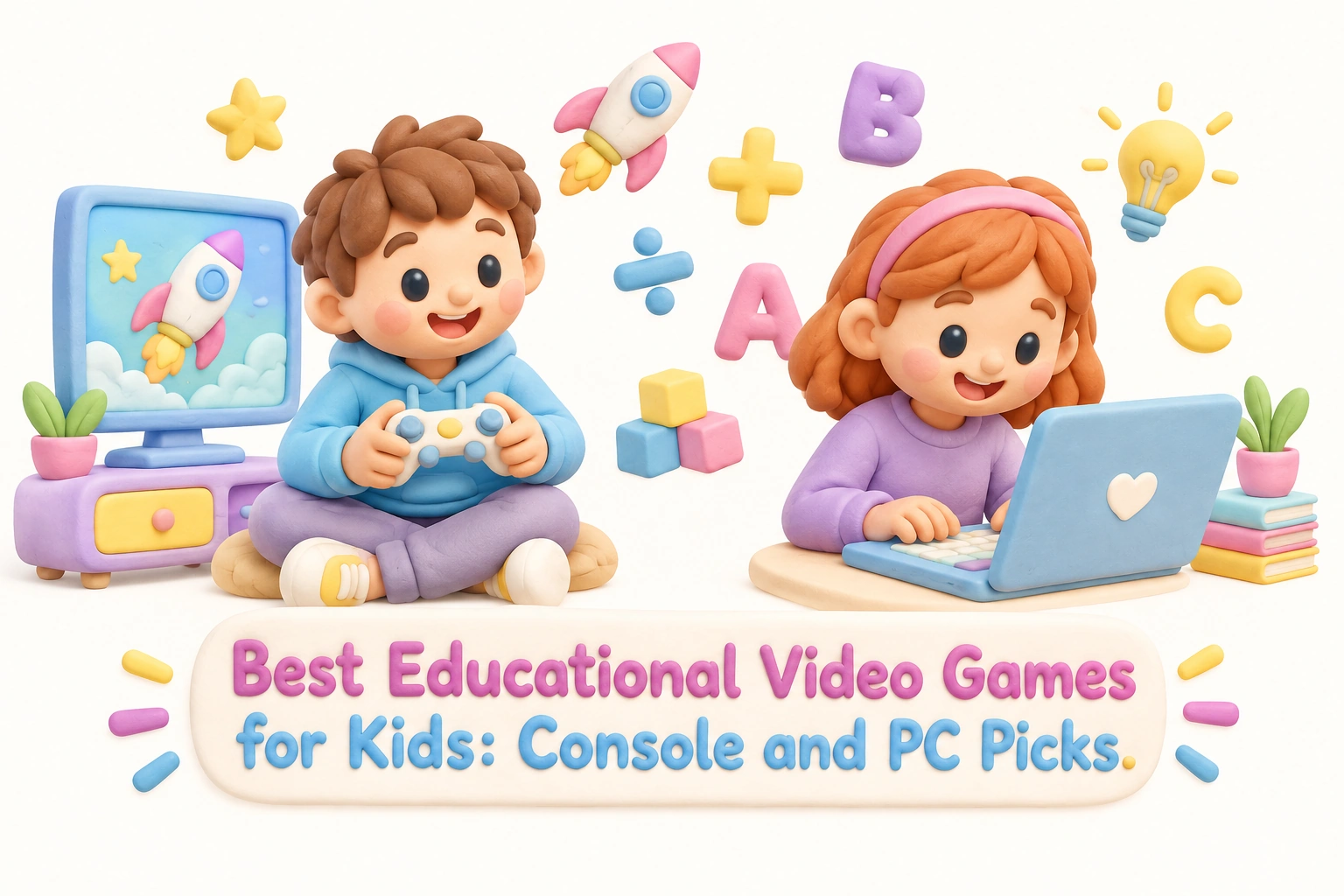
Educational video games occupy a genuinely useful space between structured learning and play, offering children a way to build real skills while staying engaged in something they actually want to do. This guide covers the strongest console and PC picks organized by age group and subject, explains what makes a game genuinely educational rather than simply entertaining, and gives parents the practical information they need to choose wisely, manage screen time, and stay involved in their child’s digital learning.
Key Takeaways
- The most effective educational video games align with clear learning objectives, offer adaptive challenge, and encourage problem-solving rather than passive consumption.
- Age-appropriateness matters: a game that works well for a ten-year-old may frustrate a six-year-old or bore a teenager. ESRB ratings and subject-area fit should both guide your choice.
- Some of the most educationally valuable games are not marketed as educational at all — so-called stealth learning titles like Minecraft and Civilization VI can build critical thinking skills, historical reasoning, and creative thinking without feeling like schoolwork.
- Free-to-play options including Khan Academy Kids, Prodigy Math, and Scratch (MIT) offer strong educational value with no upfront cost, though some use freemium or subscription models for premium features.
- Parental involvement — co-playing, discussing in-game decisions, and setting clear screen time guidelines — significantly increases the developmental benefit of any educational game.
What Makes a Video Game Genuinely Educational?
Not every game with a math problem or a historical setting qualifies as a strong educational tool. Genuine game-based learning happens when a game’s core mechanics require the player to apply a skill — not just consume information. A game that asks a child to solve a physics puzzle to advance a level is exercising different cognitive muscles than one that interrupts gameplay with a multiple-choice quiz. The distinction matters because engagement and transfer of learning are closely linked: children are more likely to retain and apply skills they practiced in a meaningful context.
Researchers and educators generally look for several qualities when evaluating educational video games. First, the game should have clear learning objectives embedded in its design, not bolted on as an afterthought. Second, it should offer adaptive learning — adjusting difficulty as the child progresses — so that neither boredom nor frustration derails engagement. Third, it should provide meaningful feedback that helps the child understand why an answer or approach was correct or incorrect, rather than simply marking it wrong. Fourth, the content should be age-appropriate in both cognitive demand and thematic material, which is where ESRB ratings (E for Everyone, E10+) and resources like Common Sense Media become useful reference points for parents.
Edutainment titles from earlier decades often failed because they prioritized curriculum delivery over genuine play. Modern educational games tend to be more sophisticated, blending curriculum-aligned content with mechanics that children find intrinsically motivating. The best examples make learning feel like a natural consequence of playing well.
Research-Backed Benefits of Educational Video Games
The evidence base for educational video games is growing, though it remains uneven across different skill domains. Studies in cognitive psychology suggest that well-designed games can support working memory, visual-spatial skills, and executive function — the set of mental processes that includes planning, flexible thinking, and impulse control. These are foundational skills that support academic performance across subjects.
Research published in peer-reviewed journals has found that certain action-oriented games may improve reading fluency in children with dyslexia by training rapid visual processing, a finding that challenges the assumption that only explicitly literacy-focused games support reading development. For mathematics, curriculum-aligned games like Prodigy Math have been associated with increased engagement and practice time, which can support math fluency even when direct effect sizes on test scores are modest. It is worth noting that most studies measure short-term outcomes, and long-term developmental gains depend heavily on consistent use, content quality, and the broader learning environment.
Educational video games may also support social-emotional learning when they involve co-op play or collaborative problem-solving. Games that require players to negotiate, take turns, or work toward a shared goal can encourage empathy and teamwork in ways that solo drill-and-practice software does not. As with all digital media, outcomes vary by child, and parental involvement remains one of the strongest predictors of whether a game’s educational potential is realized.
Best Educational Video Games for Preschool and Early Elementary Ages (3–8)
Young children benefit most from games that are visually clear, forgiving of mistakes, and focused on foundational skills like letter recognition, number sense, and basic vocabulary. The following titles are well-regarded for this age range across multiple platforms.
Khan Academy Kids (Free, iOS / Android / PC)
Khan Academy Kids is a free-to-play app covering reading, language arts, math, and social-emotional learning for children aged two through eight. It uses adaptive learning to adjust content to each child’s pace, and its curriculum-aligned activities are developed in partnership with learning scientists. There are no in-app purchases, no advertising, and no subscription required — a meaningful distinction in a market where many free apps monetize through premium upgrades. Khan Academy Kids is one of the clearest examples of high-quality edutainment available at no cost to families.
Endless Alphabet (Free base app, iOS / Android)
Endless Alphabet uses animated monster characters to introduce vocabulary words through interactive puzzles. Each word is accompanied by a short animated scene that illustrates its meaning, supporting both vocabulary acquisition and comprehension. The app is well-suited to preschool-age children and early readers, and its playful design keeps engagement high without relying on reward mechanics that can undermine intrinsic motivation.
Minecraft (E10+, Nintendo Switch / Nintendo Switch 2 / PC / PlayStation / Xbox)
Minecraft is one of the most widely used educational video games in the world, both in homes and in classrooms. Its open-world sandbox design encourages creativity, spatial reasoning, and iterative problem-solving. Children who build structures in Minecraft are practicing visual-spatial skills and basic geometry; those who engage with redstone circuits are exploring rudimentary logic and engineering concepts. Minecraft Education Edition, available separately for schools, adds curriculum-aligned lessons in science, history, coding, and more. For home use, the standard version is appropriate for children aged eight and up, though many younger children engage with it successfully under parental supervision. The Nintendo Switch 2 supports the current version of Minecraft, making it accessible on the latest hardware.
LEGO Video Games (E, Nintendo Switch / PC / PlayStation / Xbox)
The LEGO series — including LEGO Star Wars, LEGO Marvel, and LEGO Harry Potter — combines local multiplayer co-op play with puzzle-solving, exploration, and narrative comprehension. These games are not marketed as educational, but they consistently appear in educator and parent recommendations because they develop logical reasoning, cooperative play, and story comprehension in an age-appropriate, low-stakes environment. The co-op format makes them particularly well-suited to parent-child play sessions, which research suggests amplifies the developmental benefit of any game.
Best Educational Video Games for Upper Elementary Ages (9–12)
Children in this age range are ready for more complex systems, longer-form challenges, and games that reward sustained effort. The following titles address a range of subjects and skill areas.
Prodigy Math Game (Free-to-play with optional subscription, PC / iOS / Android)
Prodigy Math is a role-playing game in which children advance by answering math questions aligned to their school curriculum. The adaptive learning system adjusts question difficulty based on performance, and teachers can assign specific content areas. The base game is free-to-play; a paid membership unlocks cosmetic items and additional in-game content but does not affect the educational content itself. Parents should be aware that Prodigy uses a freemium model — children may encounter prompts to upgrade — so setting expectations in advance is helpful. Progress tracking tools allow parents and teachers to monitor which skills a child has practiced and where gaps remain.
Kerbal Space Program (E10+, PC / PlayStation / Xbox)
Kerbal Space Program tasks players with designing, building, and launching rockets and spacecraft for a fictional space agency. The game’s physics simulation is genuinely accurate enough that it has been used in STEM education contexts. Children who engage seriously with Kerbal Space Program develop an intuitive understanding of orbital mechanics, aerodynamics, and iterative engineering — the process of building, testing, failing, and redesigning. It is one of the strongest examples of stealth learning available on PC, and it is particularly well-suited to children with an interest in science or engineering. The game is available on PC via Steam and on current-generation consoles.
Scribblenauts Unlimited (E10+, PC / Nintendo Switch)
Scribblenauts Unlimited is a puzzle game in which players solve problems by typing any word they can think of to summon an object or character. The game’s enormous vocabulary database rewards creative thinking and lateral problem-solving, and it incidentally builds vocabulary and spelling awareness. Because there is rarely a single correct answer, children are encouraged to experiment and think flexibly — a quality that distinguishes it from more prescriptive educational software.
Zoombinis: Logical Journey (E, PC / iOS / Android)
Zoombinis: Logical Journey is a classic logic and critical thinking game that has been updated for modern platforms. Players guide small creatures through a series of puzzles that require pattern recognition, logical reasoning, and systematic thinking. The game has been used in educational settings for decades and remains one of the most effective tools for developing logical reasoning in children aged eight to twelve. It does not require reading fluency to engage with, making it accessible to a wider range of learners.
Rabbids Coding! (Free, PC)
Rabbids Coding! is a free-to-play game developed in partnership with educators to introduce programming concepts through block coding. Players write simple sequences of instructions to guide the Rabbids characters through levels, learning the fundamentals of computational thinking — sequencing, loops, and conditionals — without needing prior coding experience. It is one of the most accessible introductions to coding for children aged seven and up, and its free availability makes it easy to try without financial commitment.
Stealth Learning: Games That Teach Without Feeling Like School
Some of the most educationally valuable games available are not marketed as educational at all. These stealth learning titles embed genuine skill development in gameplay that children find intrinsically engaging, which means they often sustain longer and more motivated practice than explicitly educational software.
Civilization VI (PC, Nintendo Switch — rated E10+) is a strategy game in which players build and manage a civilization from ancient times to the modern era. Children who play Civilization VI encounter real historical civilizations, geographical concepts, resource management, and cause-and-effect reasoning about political and economic decisions. The game does not teach history in a curriculum-aligned way, but it builds historical curiosity and systems thinking that can complement classroom learning. It is best suited to children aged twelve and up due to its complexity.
Animal Crossing: New Horizons (E, Nintendo Switch / Nintendo Switch 2) is a life-simulation game that involves managing resources, planning a community layout, learning about real-world fish and insects, and engaging in simple economics through its in-game marketplace. Its gentle pacing and creative freedom make it particularly well-suited to children who find faster-paced games overwhelming. The game also supports social connection through its local and online multiplayer features.
Planet Zoo and Zoo Tycoon (PC, Xbox) place players in charge of designing and managing a zoo, requiring them to research animal habitats, manage budgets, and balance visitor satisfaction with animal welfare. These games develop research habits, systems thinking, and an interest in biology and conservation — all without presenting themselves as educational tools.
Best Educational Games for Tweens and Teens (12+)
Older children benefit from games that offer genuine intellectual challenge, creative agency, and opportunities to develop skills that feel relevant beyond the game itself.
Game Builder Garage (E, Nintendo Switch)
Game Builder Garage teaches programming concepts by guiding players through the process of building their own video games. It uses a visual, node-based programming system that introduces logic, variables, and game design principles in an accessible way. For tweens and teens interested in technology or game design, it offers a meaningful introduction to computational thinking without requiring prior coding experience.
Scratch (Free, PC / Browser — MIT)
Scratch, developed by the MIT Media Lab, is a free block coding platform that allows children and teens to create their own interactive stories, games, and animations. It is used in schools worldwide and has a large community of young creators who share and remix each other’s projects. Scratch is not a game in the traditional sense, but it functions as one of the most effective tools for developing coding skills, creative thinking, and computational reasoning available to young people. It is free-to-play with no in-app purchases and no subscription required.
Poly Bridge 2 (E, PC / iOS)
Poly Bridge 2 is a bridge-building puzzle game that challenges players to design structures capable of supporting vehicles within a budget. It develops engineering intuition, spatial reasoning, and iterative problem-solving in a format that is genuinely engaging for older children and teens. The game is available on PC via Steam at a modest one-time purchase price.
Free vs. Paid Educational Games: What Parents Should Know
The price of an educational game does not reliably predict its educational quality. Several of the strongest options available — Khan Academy Kids, Scratch, Rabbids Coding!, and the base version of Prodigy Math — are free-to-play. Others, like Kerbal Space Program and Poly Bridge 2, require a one-time purchase typically in the range of ten to thirty dollars. Console titles like Minecraft and Civilization VI generally cost twenty to forty dollars at retail.
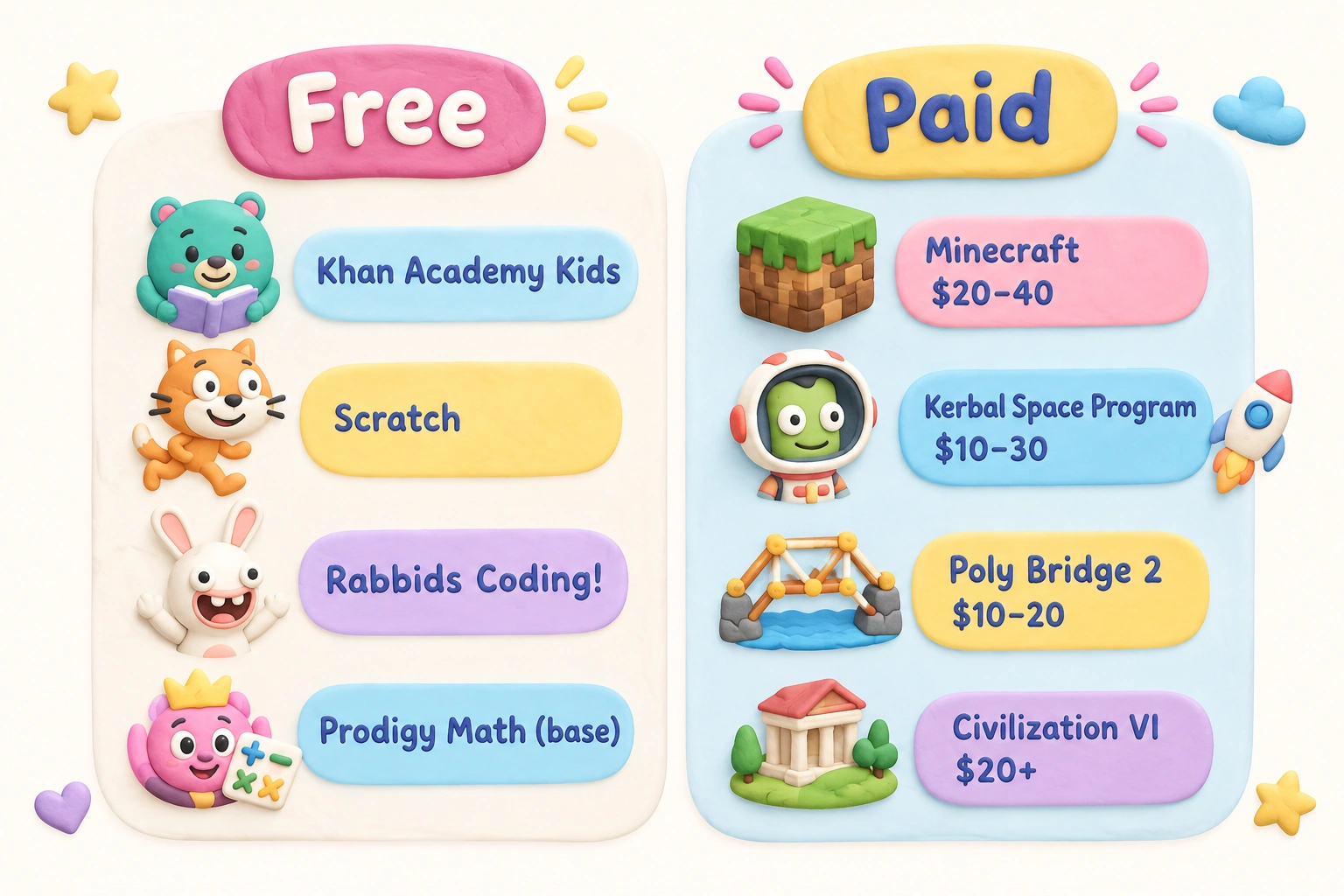
Parents should pay particular attention to subscription and freemium models. Prodigy Math and CodeSpark Academy both offer free base access with optional paid subscriptions that unlock additional content. In both cases, the free version provides genuine educational value, but children may encounter in-game prompts encouraging upgrades. Setting clear expectations with children before they begin playing — and enabling parental controls on spending — helps prevent unintended purchases. Most major consoles, including Nintendo Switch, PlayStation, and Xbox, offer robust parental controls that allow parents to restrict in-app purchases, set screen time limits, and monitor play history.
Parental Controls, Online Safety, and Screen Time Guidance
Choosing an age-appropriate, educationally sound game is only part of the picture. How a game is used matters as much as which game is chosen. The American Academy of Pediatrics recommends that parents prioritize content quality over raw screen time duration, and that they remain involved in their children’s digital media use — particularly for younger children. Co-playing with a child, asking questions about what they are doing in a game, and connecting in-game experiences to real-world learning are all associated with better outcomes than unsupervised independent use.
Online features in games like Minecraft and Animal Crossing introduce additional considerations around privacy and communication. Parents should review whether a game includes chat features, how those features can be restricted, and what data the game collects. Common Sense Media provides detailed, independently reviewed information on these points for most major titles and is a reliable resource for parents navigating these decisions.
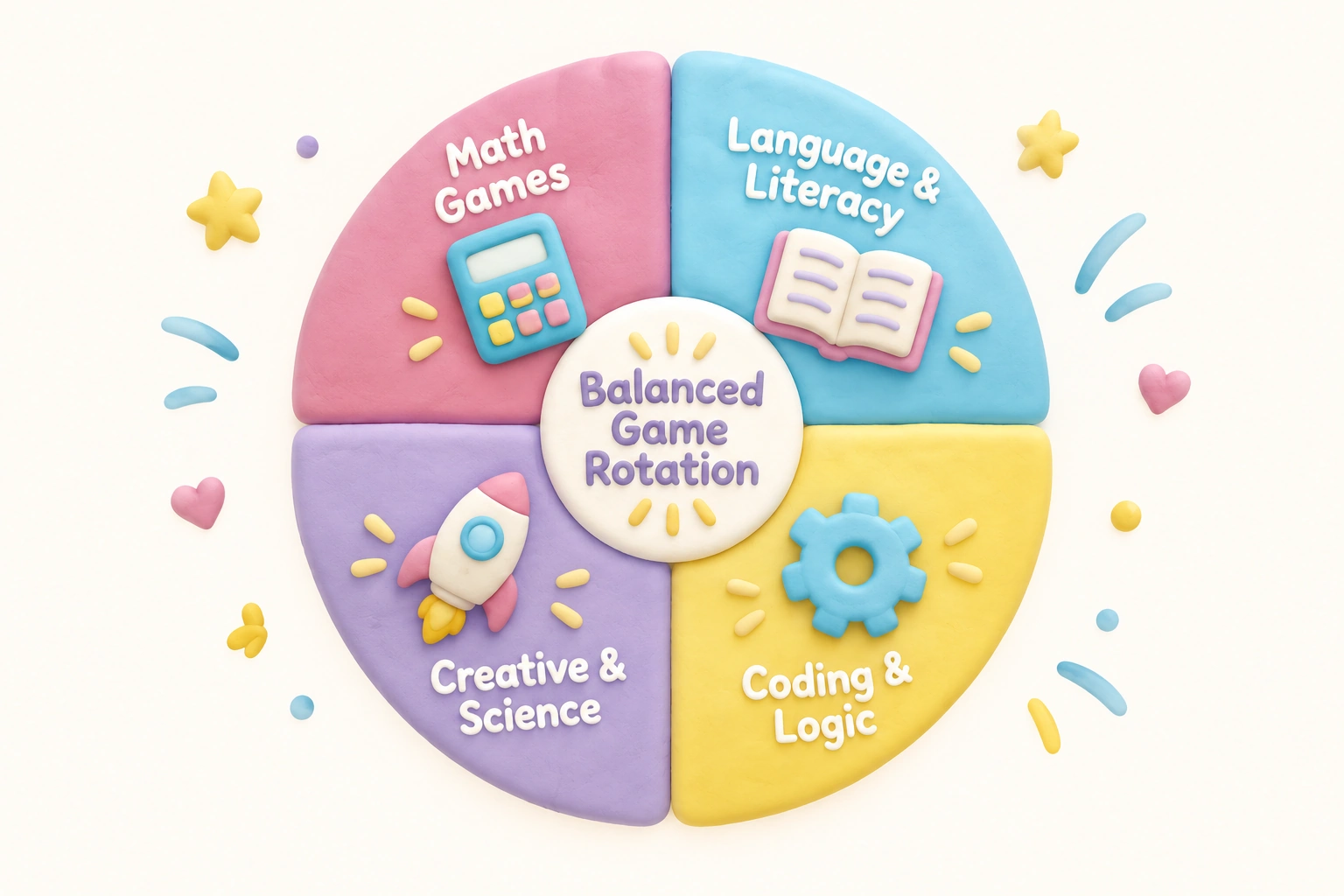
Screen time guidelines from the AAP and equivalent bodies emphasize balance rather than strict time limits for school-age children. A child who spends forty-five minutes playing a genuinely educational game and then engages in physical play, reading, or face-to-face social interaction is using digital media in a healthier pattern than one who cycles through multiple screens for several hours without breaks or variety. Building a deliberate game rotation — alternating between math-focused, language-focused, and creative or logic-based games across a week — can help ensure that digital play time supports a range of developmental domains rather than drilling a single skill repeatedly.
Educational Games and Children with Learning Differences
Educational video games may offer particular benefits for children with dyslexia, ADHD, or autism spectrum conditions, though this area of research is still developing and outcomes vary significantly by individual. For children with dyslexia, games that train rapid visual processing and phonological awareness in a low-pressure, game-based context may reduce the anxiety often associated with reading practice. For children with ADHD, games that provide immediate feedback, clear goals, and adjustable pacing can support sustained attention in ways that traditional worksheets may not. Parents of children with learning differences should consult with their child’s educational team before selecting games specifically for therapeutic purposes, and should treat games as a complement to — not a replacement for — specialist support.
Frequently Asked Questions
What ESRB rating should I look for in educational games for young children?
For children under ten, look for games rated E for Everyone by the ESRB. Games rated E10+ are generally appropriate for children aged ten and up and may contain mild fantasy violence or slightly more complex themes. The ESRB website provides detailed content descriptors for every rated game, which can help you assess suitability beyond the broad rating category.
Is Minecraft actually educational, or is it just a popular game?
Minecraft has genuine educational value, particularly for developing creativity, spatial reasoning, and iterative problem-solving. Minecraft Education Edition, used in thousands of schools, adds curriculum-aligned lessons across multiple subjects. The standard home version supports the same core skills through open-ended play, and parental involvement in discussing what a child is building or exploring can deepen the learning further.
Are free educational games as good as paid ones?
Some of the highest-quality educational games available — including Khan Academy Kids, Scratch, and Rabbids Coding! — are completely free. Price is not a reliable indicator of educational quality. What matters more is whether the game has clear learning objectives, adaptive challenge, meaningful feedback, and age-appropriate content. Always check whether a free game uses a freemium model with in-app purchases before letting a child play independently.
How much screen time is appropriate if my child is playing educational games?
The American Academy of Pediatrics does not set a single universal time limit for school-age children, but emphasizes that screen time should not displace sleep, physical activity, homework, or face-to-face social interaction. Content quality matters: an hour of genuinely educational, interactive gameplay is developmentally different from an hour of passive video consumption. Building in natural breaks and balancing digital play with offline activities is more important than hitting a specific minute count.
Can educational video games help children who struggle with math or reading?
Educational games can make practice more engaging for children who find traditional methods frustrating, which may support skill development over time. Games like Prodigy Math provide adaptive practice that adjusts to a child’s level, reducing the discouragement that comes from work that is too difficult. However, games are most effective as a supplement to — not a replacement for — targeted instruction, particularly for children with significant learning challenges. If a child is struggling significantly, consulting a teacher or educational specialist is the most important step.
What is the difference between Minecraft and Minecraft Education Edition?
The standard version of Minecraft is a commercial game available on all major platforms. Minecraft Education Edition is a separate version designed for classroom use, with built-in lesson plans, assessment tools, and curriculum-aligned content across subjects including science, history, coding, and mathematics. Education Edition requires a school or organizational license and is not typically available for individual home purchase, though Microsoft periodically offers home access options.
Building a Game Rotation That Supports Balanced Development
The most effective approach to educational video games is not finding a single perfect title but building a thoughtful rotation across different skill areas. A child who plays Prodigy Math for math fluency, Scratch for coding and creative thinking, and Minecraft or a LEGO title for spatial reasoning and co-op play is covering a broader range of developmental domains than one who plays the same game every day. Rotating between subject areas — math, language, logic, science, creativity — across a week mirrors the variety of a school curriculum and reduces the risk of over-drilling one skill while neglecting others.
When selecting games for a rotation, consider your child’s current interests and strengths alongside the areas where additional practice might be beneficial. A child who loves building in Minecraft might be ready to explore Kerbal Space Program or Game Builder Garage as their skills develop. A child who enjoys word games might move from Endless Alphabet to Scribblenauts Unlimited as their reading confidence grows. Treating educational games as a progression — rather than a fixed set of titles — keeps engagement high and ensures that the challenge level continues to match the child’s developing abilities. Discussing games together, asking what a child learned or figured out during a session, and occasionally playing alongside them transforms screen time from a passive habit into an active part of family learning life.

Take a short quiz to find out what your everyday choices say about your parenting style
When your child is curious about something new, what’s your instinct?
Take a short quiz to find out what your everyday choices say about your parenting style
“Can I download this app?” What happens next?
Take a short quiz to find out what your everyday choices say about your parenting style
When it comes to rules at home, which sounds most like you?
Take a short quiz to find out what your everyday choices say about your parenting style
If you could give your child one life skill today, what would you pick?
Take a short quiz to find out what your everyday choices say about your parenting style
Your child gets to choose what to watch. What would your ideal setup look like?
Take a short quiz to find out what your everyday choices say about your parenting style
Pick your parenting superpower ✨