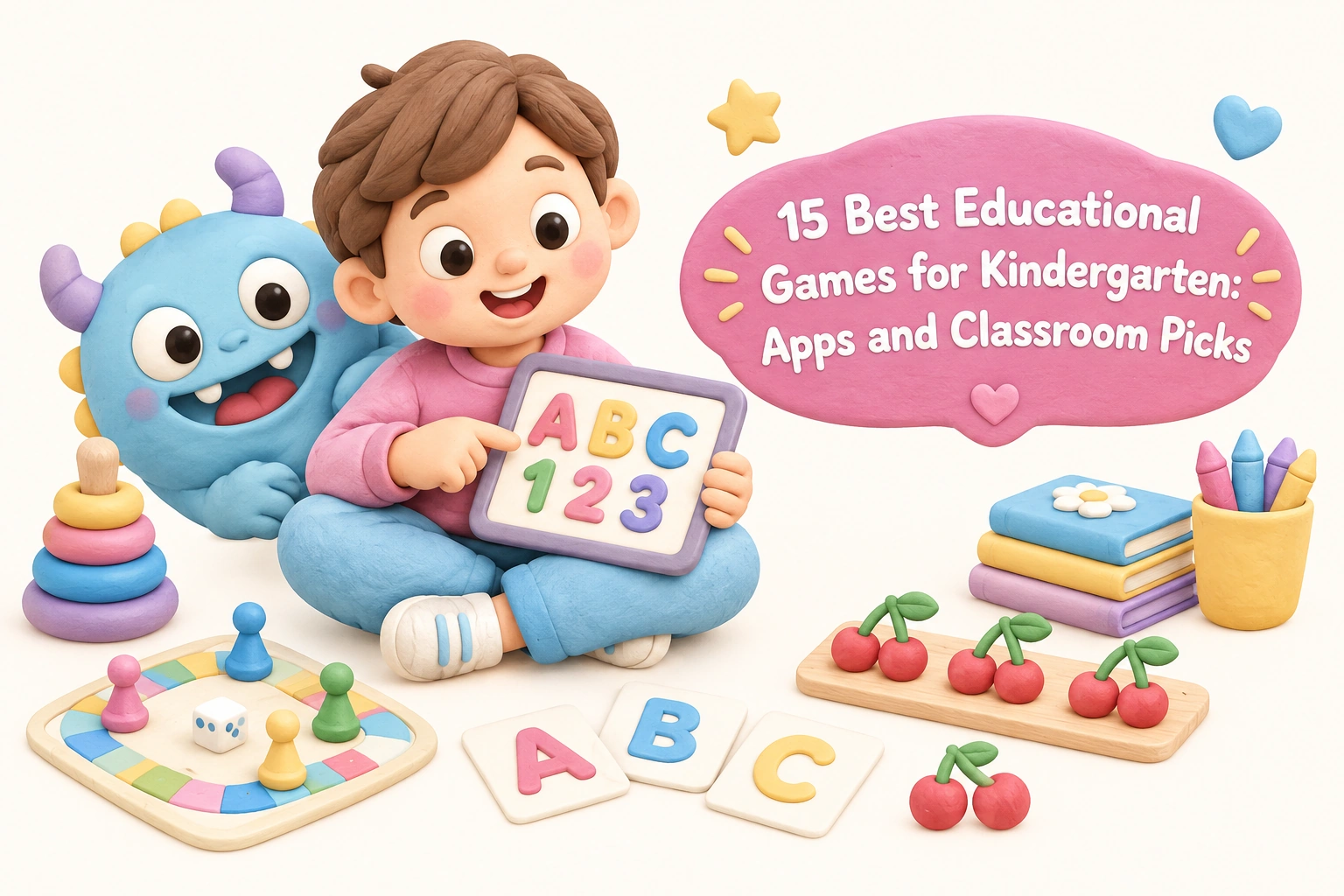
15 Best Educational Games for Kindergarten: Apps and Classroom Picks

 Discover a Free Education Video App for Kids
Pastory uses AI to personalize educational video content based on your child’s interests and personality. Safe, engaging, and built for curious young minds. Sign up now to stay updated and enjoy early access with a free trial
Choosing the right educational games for kindergarten can feel overwhelming when every app store and teacher blog offers a different top-ten list. This guide cuts through the noise by combining the best digital apps with physical and classroom picks, giving parents and teachers a single, honest resource. Each recommendation includes what skills it targets, what’s genuinely free, and whether it works offline — details that most lists skip entirely.
Key Takeaways
- The strongest kindergarten learning games combine active engagement with a specific skill focus — phonics, number sense, sight words, or social-emotional learning — rather than passive entertainment dressed up as education.
- Free apps vary widely in quality; some offer a complete curriculum at no cost, while others use a freemium model where the most useful content sits behind a paywall.
- Physical board games and classroom activity games remain highly effective for hands-on learning, fine motor development, and turn-taking skills that screens cannot fully replicate.
- The American Academy of Pediatrics recommends that screen time for children aged 2–5 be limited and that caregivers co-engage with digital content; kindergarten-aged children (5–6) benefit most when an adult participates or reviews progress.
- No single game covers every developmental need — the best approach combines two or three well-chosen tools across digital and non-digital formats.
How to Evaluate Educational Games for Kindergarten
Before diving into specific picks, it helps to understand what separates a genuinely educational game from one that simply looks the part. Research on play-based learning consistently shows that children learn most effectively when a game requires active decision-making, provides immediate feedback, and connects to a skill they are ready to practice. Passive tapping through animations, by contrast, may hold a child’s attention without building any lasting competency. When evaluating any kindergarten learning game — digital or physical — consider four practical questions: Does it target a specific, age-appropriate skill? Does it adjust to the child’s current level? Is the feedback meaningful rather than just celebratory? And does it encourage the child to think rather than simply react?
Cost transparency also matters. Many apps advertise as free but restrict core content behind a subscription or in-app purchases. A genuinely free app with limited but complete content is often more useful than a freemium app that interrupts learning with upgrade prompts. The picks below note what each option actually offers at no cost.
Best App-Based Educational Games for Kindergarten
1. Khan Academy Kids
Khan Academy Kids is one of the most comprehensive free educational apps available for children aged 2–8. It covers early literacy skills, phonics-based learning, basic math, social-emotional learning, and creative activities — all without ads or in-app purchases. The app includes a parent dashboard for progress tracking and works offline after the initial download, making it practical for travel or areas with limited connectivity. Khan Academy Kids is widely regarded as teacher-approved and is frequently recommended by early childhood educators as a starting point for families new to educational apps.
Best for: Families wanting a broad, completely free, ad-free curriculum app. Cost: Free. Platform: iOS, Android. Offline: Yes.
2. PBS Kids Games
PBS Kids Games draws on familiar characters from shows such as Curious George, Daniel Tiger, and Odd Squad to deliver age-appropriate activities covering early math, literacy, science, and social-emotional learning. The app is free and ad-free, supported by public broadcasting funding. Individual games vary in depth, but the social-emotional learning content — particularly through Daniel Tiger — is notably strong for kindergarten-aged children working on emotional regulation and empathy. Offline availability is limited to downloaded episodes rather than all games.
Best for: SEL-focused play and character-based engagement. Cost: Free. Platform: iOS, Android, web. Offline: Partial.
3. Teach Your Monster to Read
Teach Your Monster to Read is a phonics-based app developed with input from literacy researchers and aligned with systematic phonics instruction. Children create a monster character and guide it through a story-driven world, practicing letter sounds, blending, and early reading skills at each stage. The app is structured to follow a clear phonics progression, which distinguishes it from apps that treat phonics as one feature among many. The mobile version requires a one-time purchase, though a free browser version is available. It is particularly well-suited for children who are beginning to decode words and need structured, sequential phonics practice.
Best for: Systematic phonics and early reading. Cost: Free (browser); paid (mobile). Platform: iOS, Android, web. Offline: Yes (mobile).
4. Endless Alphabet
Endless Alphabet by Originator focuses on vocabulary building through animated, interactive puzzles. Each word is introduced with a short animated scene that illustrates its meaning, and children drag letters into place while hearing each letter sound. The app does not follow a phonics curriculum sequence, but it is highly effective for expanding vocabulary and reinforcing letter recognition in an engaging, low-pressure format. The base app includes a selection of free words; additional word packs require purchase. It works offline and is appropriate for ages 4–7.
Best for: Vocabulary building and letter recognition. Cost: Freemium. Platform: iOS, Android. Offline: Yes.
5. SplashLearn
SplashLearn offers a curriculum-aligned math and reading program covering kindergarten through Grade 5. For kindergarten specifically, it addresses number sense, counting, addition, subtraction, shapes, and early literacy skills including sight word practice and phonics. The platform includes a parent dashboard with detailed progress tracking. A free tier provides access to a limited number of activities per day; a paid subscription unlocks the full curriculum. SplashLearn is frequently used in both home and classroom settings and is designed to adapt to each child’s current level.
Best for: Curriculum-aligned math and reading with progress tracking. Cost: Freemium (subscription for full access). Platform: iOS, Android, web. Offline: Limited.
6. Starfall
Starfall is one of the longest-established free phonics and early literacy platforms, available as both a website and an app. Its phonics content is systematic and research-backed, covering letter sounds, blending, and early reading through interactive stories and songs. The free version is genuinely substantial, covering core phonics instruction without requiring payment. A paid membership adds math content and additional reading levels. Starfall is widely used in kindergarten classrooms as a supplementary phonics tool and is appropriate for ages 3–8.
Best for: Free, structured phonics instruction. Cost: Free (core phonics); paid membership for extras. Platform: iOS, Android, web. Offline: Limited (web-based).
7. ABCmouse
ABCmouse is a subscription-based early learning platform covering reading, math, science, and art for ages 2–8. It offers over 10,000 individual activities organized into a structured learning path, and its breadth is one of its main strengths. The platform includes progress tracking and a rewards system designed to maintain motivation. ABCmouse does not offer a meaningful free tier beyond a short trial period, which is an important consideration for families on a budget. It is best suited for families who want a single comprehensive platform rather than a collection of individual apps.
Best for: Comprehensive subscription curriculum. Cost: Subscription (trial available). Platform: iOS, Android, web. Offline: Limited.
8. Duolingo ABC
Duolingo ABC is a free, ad-free phonics and early reading app for children aged 3–6. It uses the same lesson-based structure as the main Duolingo language app, breaking phonics instruction into short, manageable sessions. The app covers letter recognition, letter sounds, blending, and sight word practice through interactive mini-games. It is entirely free with no in-app purchases, which makes it one of the most accessible phonics-based learning tools available. Offline functionality is available after content is downloaded.
Best for: Free phonics and early reading in short sessions. Cost: Free. Platform: iOS, Android. Offline: Yes (after download).
9. DragonBox Numbers
DragonBox Numbers introduces number sense and early arithmetic through a playful, visual approach in which numbers are represented as characters called Nooms. Children manipulate these characters to explore quantity, addition, and subtraction without relying on rote memorization. The app is designed for ages 4–8 and is particularly effective for children who find abstract number symbols difficult to connect to real quantities. It requires a one-time purchase with no ongoing subscription. DragonBox Numbers is frequently cited by mathematics educators as an example of genuinely conceptual early math learning rather than drill-based practice.
Best for: Conceptual number sense and early arithmetic. Cost: Paid (one-time). Platform: iOS, Android. Offline: Yes.
10. ScratchJr
ScratchJr, developed by MIT Media Lab and the Tufts DevTech Research Group, introduces basic programming concepts to children aged 5–7 through a visual, block-based interface. Children create interactive stories and simple games by snapping together programming blocks, which supports problem-solving, sequencing, and early computational thinking. ScratchJr is completely free and works offline. While it does not target phonics or number sense directly, it develops critical thinking and creativity — skills that complement academic learning. It is particularly well-suited for classroom use and homeschool settings where STEM exploration is a priority.
Best for: Problem-solving, creativity, and early coding concepts. Cost: Free. Platform: iOS, Android. Offline: Yes.
Best Board Games for Kindergarten
11. Zingo
Zingo by ThinkFun is a bingo-style game that builds sight word recognition and vocabulary in children aged 4 and up. A spring-loaded tile dispenser reveals two picture-and-word tiles at a time, and players race to match them to their game card. The fast pace keeps kindergarteners engaged, and the repetition of sight words across multiple rounds reinforces recognition without feeling like a drill. Zingo is a strong classroom pick because it accommodates up to six players, requires no reading ability to begin, and can be completed in under fifteen minutes. A number version, Zingo 1-2-3, targets early math skills.
Best for: Sight word practice and letter recognition in a group setting. Skill focus: Literacy, vocabulary. Players: 2–6.
12. Spot It! (Dobble)
Spot It!, known as Dobble outside North America, is a visual perception game in which players race to find the one matching symbol between any two cards. For kindergarten use, the standard deck builds visual discrimination and processing speed, while themed educational versions target letters, numbers, or shapes. The game is compact, durable, and playable in five to ten minutes, making it practical for classroom transitions or small-group rotations. It supports fine motor skills through card handling and develops the kind of focused attention that supports early literacy and math readiness.
Best for: Visual discrimination, attention, and letter or shape recognition. Skill focus: Cognitive processing, school readiness. Players: 2–8.
13. Hi Ho! Cherry-O
Hi Ho! Cherry-O is a classic counting game for ages 3–6 in which players spin a spinner and add or remove cherries from their tree, working toward collecting ten cherries in their bucket. The game directly targets number sense, counting, and basic addition and subtraction concepts in a concrete, hands-on format. Because children physically handle the cherry pieces, it also supports fine motor skills. Hi Ho! Cherry-O is one of the most accessible early math board games available, requires no reading, and is appropriate for mixed-age groups including younger siblings.
Best for: Hands-on counting and early number sense. Skill focus: Early math, fine motor skills. Players: 2–4.
Best Classroom Activity Games (Non-Digital)
14. Alphabet Bingo
Alphabet Bingo is a teacher-approved classroom staple that reinforces letter recognition and letter sounds through a familiar game format. Teachers call out a letter name or sound, and children mark the corresponding letter on their bingo card. The game can be adapted to focus on uppercase letters, lowercase letters, or letter-sound pairs depending on where the class is in its phonics progression. It accommodates whole-class play, requires minimal materials, and can be completed in ten to fifteen minutes — making it practical for daily warm-ups or end-of-lesson reviews. Printable versions are widely available at no cost.
Best for: Whole-class phonics review and letter recognition. Skill focus: Phonics, early literacy. Setting: Classroom or home.
15. Hopscotch Math
Hopscotch Math adapts the classic playground game into a hands-on learning activity by labeling hopscotch squares with numbers, shapes, or simple addition problems. A teacher or caregiver calls out a number or equation, and children hop to the correct answer. The activity combines gross motor movement with number sense practice, which research on embodied cognition suggests may support memory consolidation in young children. Hopscotch Math requires only chalk and an outdoor space or a taped grid indoors, making it one of the most cost-effective kindergarten learning games available. It is easily differentiated for different skill levels within the same group.
Best for: Active, movement-based number sense practice. Skill focus: Early math, gross motor skills. Setting: Outdoor or indoor classroom.
Skills-to-Game Quick Reference
| Skill Area | Top Pick | Format | Cost |
|---|---|---|---|
| Phonics / Early Reading | Teach Your Monster to Read | App | Free (browser) |
| Letter Recognition | Alphabet Bingo | Classroom game | Free |
| Sight Word Practice | Zingo | Board game | Paid (one-time) |
| Vocabulary Building | Endless Alphabet | App | Freemium |
| Number Sense / Counting | Hi Ho! Cherry-O | Board game | Paid (one-time) |
| Early Math (Conceptual) | DragonBox Numbers | App | Paid (one-time) |
| Social-Emotional Learning | PBS Kids Games | App | Free |
| Problem-Solving / Coding | ScratchJr | App | Free |
| Gross Motor + Math | Hopscotch Math | Classroom activity | Free |
| Broad Curriculum (Free) | Khan Academy Kids | App | Free |
Free vs. Paid Apps: What the Difference Actually Means
The free vs. paid distinction in educational apps is more nuanced than it first appears. Genuinely free apps — Khan Academy Kids, Duolingo ABC, PBS Kids Games, ScratchJr, and Starfall’s core phonics content — offer complete, usable learning experiences at no cost. These are funded by nonprofit organizations, public broadcasting, or university research grants, which means their design priorities are educational rather than commercial.
Freemium apps such as Endless Alphabet and SplashLearn offer a meaningful free tier but restrict the most comprehensive content behind a subscription or one-time purchase. This is not inherently a problem — the paid content is often genuinely higher quality — but parents and teachers should test the free tier before committing. One-time purchase apps such as DragonBox Numbers and the mobile version of Teach Your Monster to Read typically offer the best value for families who will use them consistently, as there are no ongoing costs and no engagement-driven design incentives.
Subscription platforms such as ABCmouse provide the broadest content libraries but require ongoing payment. They are most cost-effective when a child uses the platform regularly over several months. Before subscribing, it is worth checking whether a school or local library provides free access — some do.
Screen Time Guidance for Kindergarten-Aged Children
The American Academy of Pediatrics recommends that for children aged 2–5, screen time be limited to one hour per day of high-quality programming, with caregiver co-viewing where possible. For children aged 6 and older — which includes most kindergarteners — the AAP advises placing consistent limits on screen time and ensuring it does not displace sleep, physical activity, or face-to-face interaction. These guidelines apply to educational screen time as well as entertainment, because the developmental risks of excessive sedentary screen use are not eliminated by educational content alone.
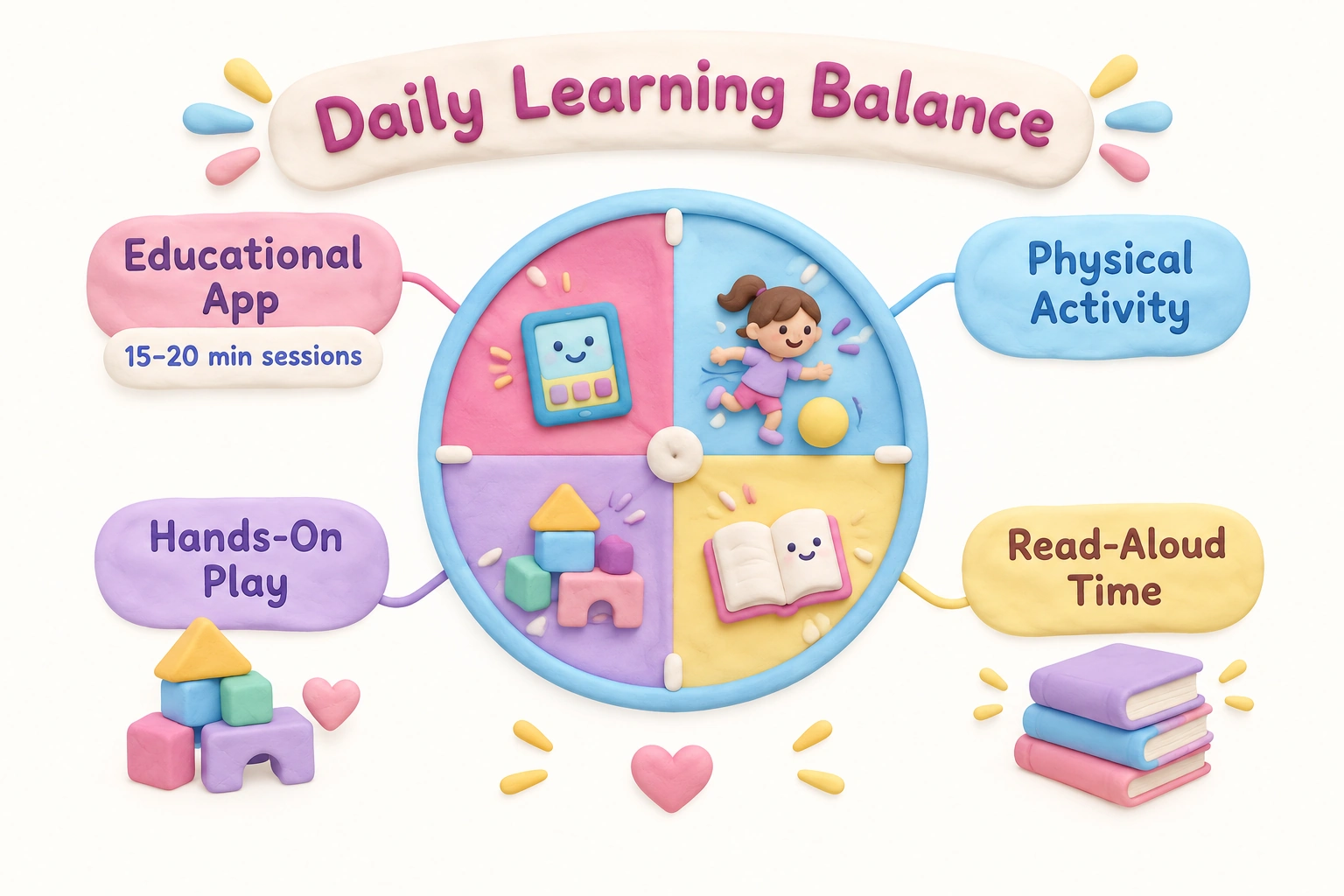
In practice, this means that even the best educational apps for kindergarten work best as one component of a broader learning day rather than a primary instructional tool. A session of fifteen to twenty minutes on a focused phonics or math app, followed by a physical activity or hands-on game, is more developmentally appropriate than an extended uninterrupted screen session. Progress tracking features in apps such as SplashLearn and Khan Academy Kids can help caregivers monitor engagement without needing to sit beside the child for every minute.
What to Watch Out For in Educational Games
Not every game marketed as educational delivers meaningful learning. Several patterns are worth recognizing before downloading or purchasing. Apps that rely primarily on reward animations — confetti, stars, and celebratory sounds — after every tap may be training children to seek stimulation rather than to engage with content. If a child can progress through an app without making meaningful choices or encountering any challenge, the game is likely providing entertainment rather than education.
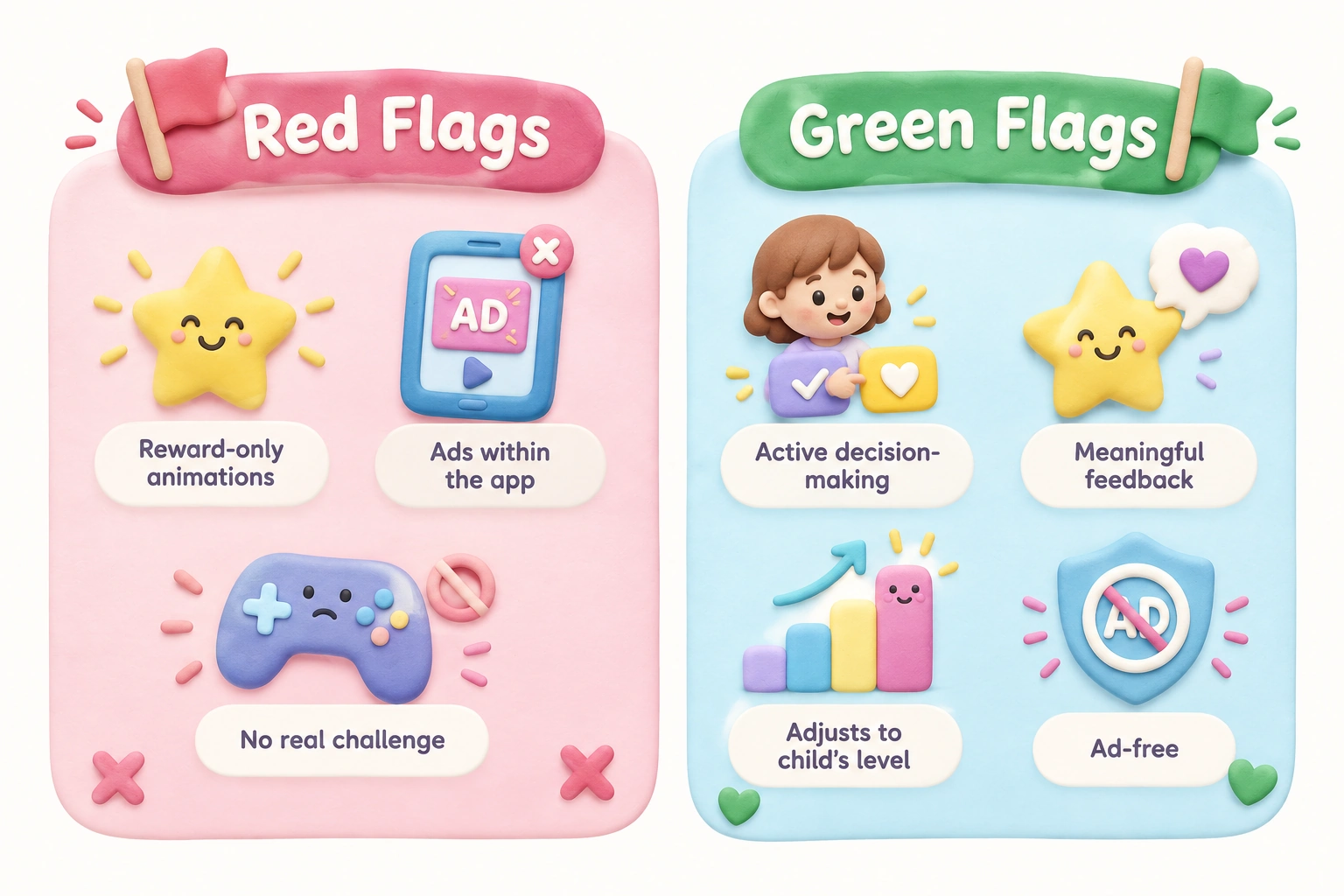
Ads within free apps are a particular concern for kindergarten-aged children, who may not yet distinguish advertising from content. Apps that include third-party advertising — even if labeled as educational — are generally not appropriate for this age group. The picks in this list are either ad-free by design or offer a clearly ad-free paid tier. Similarly, apps that require an internet connection and collect data should be reviewed against the platform’s privacy policy, particularly for classroom use where student data protection requirements may apply.
A Note for Homeschool Families
Several picks in this list are particularly well-suited to homeschool settings. Khan Academy Kids and SplashLearn both offer structured learning paths that can serve as a daily curriculum supplement, with progress tracking that helps caregivers identify which skills need more practice. ScratchJr and Hopscotch Math work well for homeschool families who prioritize STEM exploration and active learning. For phonics, Teach Your Monster to Read and Duolingo ABC provide enough structure to function as a primary phonics program for children who are just beginning to read, though they work best alongside read-aloud sessions and physical books rather than as a standalone literacy curriculum.
Accessibility and Children with Learning Differences
Children with developmental delays, learning differences, or sensory sensitivities may respond differently to the games listed here. Khan Academy Kids and PBS Kids Games are designed with accessibility in mind and include audio support throughout, which benefits children who are not yet reading independently or who have language processing differences. Zingo and Hi Ho! Cherry-O are low-pressure physical games that do not require reading and can be adapted for children who need more processing time. For children with fine motor challenges, apps that accept simple taps rather than precise dragging — such as Duolingo ABC — may be more accessible than those requiring letter tracing. Caregivers of children with identified learning differences are encouraged to consult with a specialist or occupational therapist when selecting tools, as individual needs vary considerably.
Frequently Asked Questions
What are the best free educational games for kindergarten?
Khan Academy Kids, Duolingo ABC, PBS Kids Games, ScratchJr, and Starfall’s core phonics content are all genuinely free with no meaningful paywalls. Among physical options, Alphabet Bingo and Hopscotch Math can be set up at no cost using printable materials or chalk.
How much screen time is appropriate for kindergarteners?
The American Academy of Pediatrics advises placing consistent limits on screen time for children aged 6 and older, ensuring it does not replace sleep, physical activity, or social interaction. For kindergarten-aged children, sessions of fifteen to twenty minutes on a focused educational app, with breaks for physical or hands-on activity, are generally more appropriate than extended uninterrupted use.
Are educational apps as effective as classroom games?
Research suggests that both can support learning when they are well-designed and age-appropriate, but they target different skills. Apps tend to be stronger for individualized phonics and math practice with immediate feedback. Physical and classroom games are more effective for social skills, turn-taking, gross motor development, and the kind of collaborative problem-solving that screens cannot fully replicate. A combination of both formats is likely more effective than either alone.
Which apps work offline?
Khan Academy Kids, Duolingo ABC (after download), DragonBox Numbers, ScratchJr, Teach Your Monster to Read (mobile version), and Endless Alphabet all work offline. SplashLearn and ABCmouse have limited offline functionality and generally require an internet connection for full access.
Are there educational games suitable for kindergarteners with learning differences?
Yes. Khan Academy Kids and PBS Kids Games include audio support throughout and do not require reading to navigate. Zingo and Hi Ho! Cherry-O are physical games that can be adapted for children who need more time or have fine motor challenges. For children with specific learning differences, consulting an early childhood specialist or occupational therapist before selecting tools is recommended.
What makes a kindergarten game genuinely educational?
A genuinely educational game requires active decision-making, targets a specific skill appropriate for the child’s developmental stage, provides meaningful feedback, and adjusts to the child’s current level. Games that rely primarily on reward animations without requiring real cognitive effort are unlikely to produce lasting learning gains.
Choosing the Right Mix of Educational Games for Your Kindergartener
No single app or game covers every developmental need a kindergartener has. The most effective approach is to select two or three tools that together address the skills your child is currently working on — typically a phonics or early reading tool, an early math tool, and at least one physical or classroom game that supports social interaction and hands-on learning. For most families, starting with a free, broad-curriculum app such as Khan Academy Kids alongside one physical game such as Zingo or Hi Ho! Cherry-O provides a strong, low-cost foundation.
As your child’s skills develop, you can add more targeted tools — a structured phonics app such as Teach Your Monster to Read when decoding begins, or DragonBox Numbers when abstract arithmetic becomes the focus. Teachers looking for classroom picks will find that Alphabet Bingo, Hopscotch Math, and Spot It! require minimal preparation, accommodate groups of varying sizes, and can be rotated through learning centers without significant cost. The goal is not to maximize the number of educational games in use, but to choose a small number of well-matched tools and use them consistently alongside the caregiver interaction and offline play that remain central to kindergarten development.

Take a short quiz to find out what your everyday choices say about your parenting style
When your child is curious about something new, what’s your instinct?
Take a short quiz to find out what your everyday choices say about your parenting style
“Can I download this app?” What happens next?
Take a short quiz to find out what your everyday choices say about your parenting style
When it comes to rules at home, which sounds most like you?
Take a short quiz to find out what your everyday choices say about your parenting style
If you could give your child one life skill today, what would you pick?
Take a short quiz to find out what your everyday choices say about your parenting style
Your child gets to choose what to watch. What would your ideal setup look like?
Take a short quiz to find out what your everyday choices say about your parenting style
Pick your parenting superpower ✨