Best Free Online Games for 10-Year-Olds

 Discover a Free Education Video App for Kids
Pastory uses AI to personalize educational video content based on your child’s interests and personality. Safe, engaging, and built for curious young minds. Sign up now to stay updated and enjoy early access with a free trial
Finding free online games for 10-year-olds that are genuinely age-appropriate, safe, and engaging can feel like searching for a needle in a haystack. Ten-year-olds sit at a distinctive developmental crossroads: they have longer attention spans and stronger reasoning skills than younger children, yet they are not quite ready for the social complexity and content risks of teen-oriented platforms. This guide cuts through the noise with a curated, category-by-category breakdown of browser-based games and trusted gaming websites, paired with honest safety guidance and practical screen time advice for parents.
Key Takeaways
- Many high-quality free online games for 10-year-olds require no download and no sign-up, making them immediately accessible on a browser, tablet, or Chromebook.
- Age-appropriate games for this stage should support logic and critical thinking, creative problem-solving, or social collaboration — not just passive entertainment.
- Trusted kid-safe gaming sites such as Coolmath Games, PBS Kids, Poki Kids, and Funbrain offer curated libraries with minimal or no advertising.
- Multiplayer games like Roblox and Minecraft carry real social benefits but require specific parental controls and privacy settings to be safe for a 10-year-old.
- Screen time quality matters as much as quantity: a 30-minute session on a logic puzzle game is developmentally different from 30 minutes of unstructured browsing on an open game portal.
Why 10-Year-Olds Need a Different Approach to Online Gaming
A 10-year-old is not simply an older version of a 7-year-old when it comes to digital media. Children at this stage — often described as early tweens — are developing more sophisticated reasoning, a stronger sense of fairness, and a growing interest in peer relationships and competition. According to broadly accepted child development frameworks, children around age 9 to 11 are in the concrete operational stage, meaning they can follow multi-step rules, think logically about cause and effect, and sustain focus on a single task for 20 to 40 minutes at a time. These capacities make puzzle and strategy games genuinely engaging rather than frustrating, and they make multiplayer games socially meaningful rather than merely chaotic.
This developmental profile also means that games designed for 6-year-olds will feel patronizing, while games designed for 13-year-olds may expose a 10-year-old to content, social dynamics, or competitive pressure they are not yet ready to navigate. Selecting games that match the child’s actual cognitive and social stage — rather than simply their interest level — is the most important filtering step a parent can take.
Best Free Browser-Based Game Websites for 10-Year-Olds
Browser-based games are the most practical starting point for parents because they require no download, no installation, and often no account. The following platforms are widely recognized as reliable, kid-friendly destinations with content appropriate for the 9–11 age range.
Coolmath Games
Coolmath Games is one of the most consistently recommended kid-safe gaming sites for this age group. Despite its name, the platform covers far more than mathematics: it hosts hundreds of puzzle games, strategy games, and logic challenges including Run 3, Fireboy and Watergirl, Chess, 2048, and Sudoku. Games are browser-based and most require no sign-up. The site does display some banner advertising, but it avoids video pre-roll ads and in-app purchases. For a 10-year-old who enjoys problem-solving, Coolmath Games offers genuinely challenging content that scales in difficulty — a feature that keeps engagement high without overwhelming the child.
PBS Kids Games
PBS Kids Games is a fully ad-free, COPPA-compliant platform backed by public broadcasting. While some of its content skews toward younger children, the platform includes games tied to science, geography, and creative thinking that remain engaging for 10-year-olds, particularly those who enjoy narrative-driven or educational content. No account is needed, and the site is mobile-friendly and tablet-friendly, making it a reliable option for families using an iPad or Amazon Fire tablet.
Funbrain
Funbrain combines reading games, math games, and arcade-style challenges in a single curated portal. It is particularly strong for children who enjoy word games and vocabulary challenges alongside more traditional puzzle formats. The platform is free to play, requires no registration, and has been a trusted name in educational gaming for many years. Parents should be aware that Funbrain does display some advertising, though it is generally age-appropriate banner advertising rather than intrusive video content.
Poki Kids
Poki Kids offers a large, curated library of browser-based games organized by category and age group. The platform includes adventure games, racing games, and creative games alongside puzzle and strategy titles. It is one of the more visually polished free game portals, and many of its titles are mobile-friendly. Poki does show advertising, so parents who prefer a lower-ad environment may want to use it alongside an ad-blocking browser extension or supervise sessions on shared family devices.
Arcademics
Arcademics is specifically designed to make academic skills practice feel like competitive gaming. The platform hosts multiplayer math games, typing games, and language arts games where children race against other players in real time. For a 10-year-old who is motivated by competition, Arcademics can make skills practice feel genuinely exciting. The multiplayer component uses anonymous usernames and does not include open chat, which significantly reduces social risk compared to broader multiplayer platforms.
Scratch (MIT)
Scratch, developed by the MIT Media Lab, is a free creative coding platform where children can build their own games, animations, and interactive stories. For a 10-year-old with any interest in how games are made, Scratch is an exceptional resource. It teaches computational thinking and logic in a visual, block-based environment that requires no prior coding experience. The platform has a community component where children can share and remix projects, which parents should review using the available privacy settings before enabling.
Best Free Games by Category for 10-Year-Olds
Organizing game recommendations by genre helps parents match a child’s specific interests and developmental needs rather than simply offering a long undifferentiated list.
Puzzle and Logic Games
Puzzle and strategy games are particularly well-suited to 10-year-olds because they reward the sustained attention and multi-step reasoning that children at this stage are actively developing. Strong free options include Little Alchemy 2 (a browser-based discovery game where players combine elements to create new ones), 2048 (a number-sliding strategy game available on Coolmath Games and other portals), and Mancala or Connect Four in their online versions available on several game portals. Quick Draw by Google is a creative logic game that uses machine learning to guess what the player is drawing — it is genuinely engaging for this age group and requires no account.
Educational and Science Games
National Geographic Kids and Sheppard Software both offer free, browser-based geography and science games that are genuinely educational without feeling like homework. Sheppard Software’s geography games in particular — where players place countries, capitals, and landmarks on a map — are well-regarded by educators and are appropriately challenging for a 10-year-old. Prodigy Math is a free-to-play math game with a role-playing game structure that many children in this age range find motivating, though parents should be aware that Prodigy does offer a paid membership tier with additional content.
Creative and Building Games
Minecraft Education Edition is available through many schools and offers a structured, curriculum-linked version of the popular building game. For home use, the standard Minecraft Java or Bedrock edition requires a one-time purchase, but Minecraft Classic — an older browser-based version — is available free online and gives children a taste of the creative building experience with no download required. Gamestar Mechanic is another free platform where children design their own video games, developing systems thinking and creative problem-solving in the process.
Multiplayer Games for Kids to Play with Friends
Multiplayer games for kids are among the most socially meaningful digital experiences for 10-year-olds, who are at a stage where peer relationships are increasingly central to their identity and wellbeing. Skribbl.io is a free, browser-based online Pictionary game that children can play with friends using a private room code — no account is needed and the private room feature eliminates contact with strangers. Among Us (available free on mobile) is a social deduction game that requires communication and reasoning, making it genuinely engaging for this age group when played with known friends rather than random online players. Roblox is the most popular virtual world platform for this age group and is free to play, though it carries specific safety considerations discussed in the next section.
Multiplayer Safety: What Parents Need to Know Before Setting Up Roblox and Minecraft
Roblox and Minecraft are the two most frequently named free-to-play (or low-cost) multiplayer platforms for 10-year-olds, and both offer genuine social and creative value. However, both also carry risks that are not always clearly explained in general game recommendation lists. Understanding these risks — and the specific settings that mitigate them — is essential before a child begins playing.
Roblox Safety Settings for 10-Year-Olds
Roblox is a virtual world platform that hosts thousands of user-created games, ranging from obstacle courses and role-playing games to simulation and tycoon games. For a 10-year-old, the key safety steps are: setting the account age to under 13 (which automatically restricts chat to a pre-approved word list), enabling account restrictions to limit the child to a curated list of age-appropriate games, and turning off the ability to follow links to external websites within the platform. Parents can manage these settings through the Roblox parental controls dashboard. Roblox does include in-app purchases through its virtual currency (Robux), so setting a spending limit or disabling purchases entirely is strongly recommended.
Minecraft Safety Settings for 10-Year-Olds
Minecraft’s safest mode for a 10-year-old is a private Realm — a subscription-based private server where only invited friends can join. This eliminates contact with strangers entirely. For children playing on public servers, parents should select servers with active moderation and age-appropriate communities. Microsoft Family Safety can be used to manage Minecraft screen time and purchase permissions on Xbox and PC. The game itself has no PEGI-rated violent content beyond cartoon-style combat with fictional creatures, making it broadly appropriate for this age group when server choice is managed carefully.
Honest Ad and Purchase Transparency: What the Game Sites Don’t Always Tell You
Many websites claim to offer free, ad-free games for kids, but the reality is more nuanced. Parents benefit from understanding the actual advertising landscape before handing a device to a child.
Truly ad-free platforms for this age group include PBS Kids Games and Arcademics, both of which are funded through public or institutional sources rather than advertising revenue. Low-ad platforms include Coolmath Games and Funbrain, which display banner advertising but generally avoid video pre-roll ads and intrusive interstitials. Higher-ad platforms include many general game portals where video ads play before or between games — these are common on sites that are not specifically designed for children. Parents should also watch for fake free games: titles advertised as free that require an account, a subscription, or a one-time payment to access meaningful content. Prodigy Math and Roblox both fall into this category to varying degrees, offering a free base experience with paid upgrades. This is not inherently problematic, but parents should be aware of it before a child begins playing.
Screen Time Guidance for 10-Year-Olds and Gaming
The American Academy of Pediatrics and similar professional bodies have moved away from strict minute-based screen time limits for children over 6, instead emphasizing the quality and context of screen use. For a 10-year-old, the more useful framework is to consider what the gaming session is replacing and what it is providing. A 45-minute session on a logic puzzle game that the child discusses with a parent afterward is developmentally different from 45 minutes of passive, unstructured browsing through an open game portal.
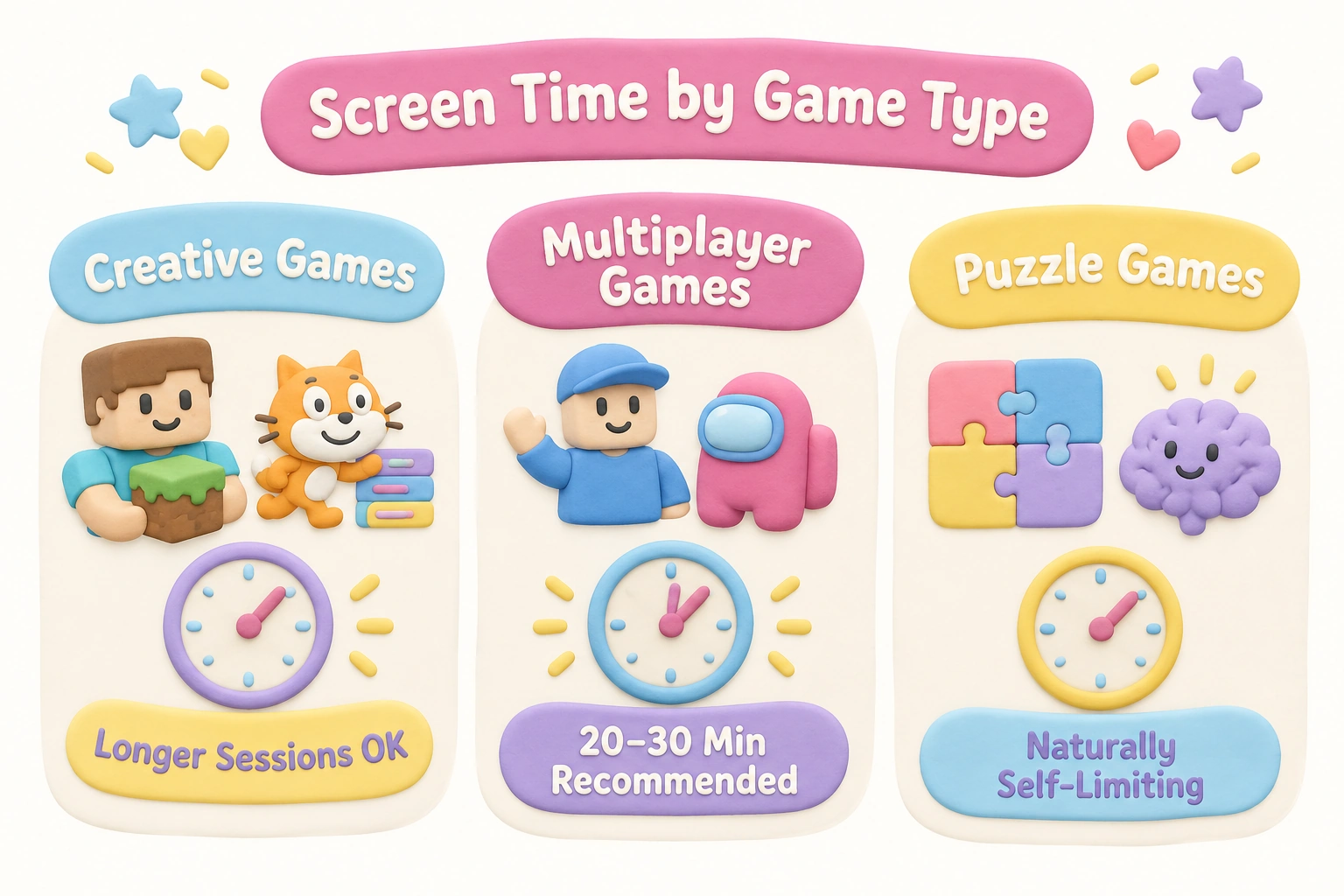
Practical session length guidance varies by game type. Open-ended creative games like Minecraft or Scratch can support sustained engagement over longer sessions because the child is actively building and problem-solving. Competitive multiplayer games like Roblox or Among Us benefit from shorter, bounded sessions — 20 to 30 minutes — because the social intensity can escalate quickly and the games are designed to encourage continued play. Puzzle and logic games like those on Coolmath Games are naturally self-limiting because individual games are short, making them easier to step away from. Parents who use tools like Google Family Link, Apple Screen Time, or Microsoft Family Safety can set daily limits and bedtime restrictions across devices without needing to monitor every session manually.
Red Flags to Watch for in Kids’ Gaming Sites
Not every site that appears in a search for free online games for kids is genuinely safe or appropriate. Parents should be alert to the following warning signs when a child discovers a new gaming website independently.
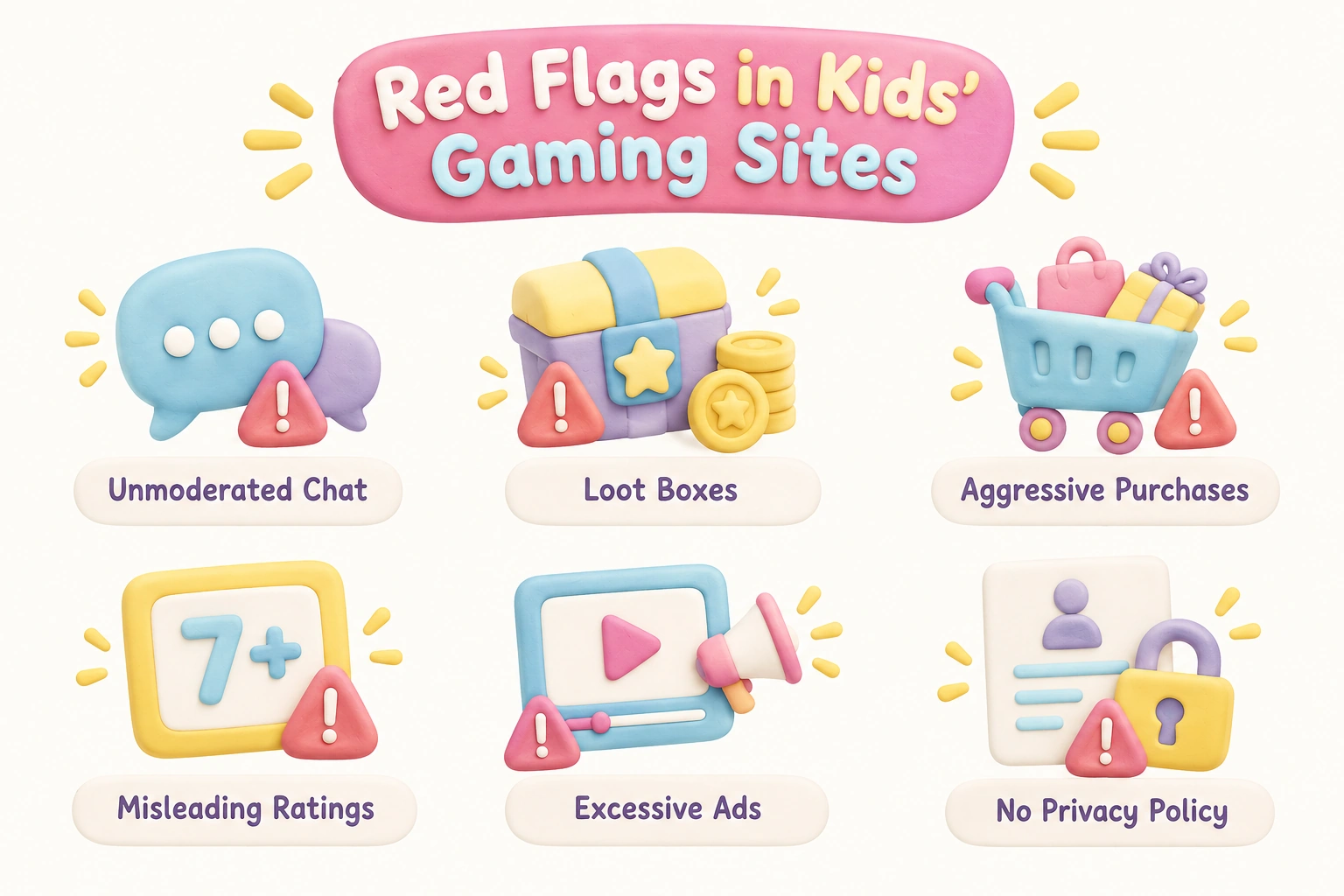
- Unmoderated open chat: Any platform that allows a 10-year-old to receive messages from unknown adults without parental oversight is a significant risk. Look for platforms that use pre-approved word lists, private room codes, or friends-only communication.
- Loot boxes and randomized purchases: Some free-to-play games include loot boxes — randomized reward systems that require real or virtual currency. These are associated with gambling-like mechanics and are not appropriate for this age group without parental awareness and spending controls.
- Aggressive in-app purchase prompts: Games that repeatedly interrupt gameplay to prompt purchases, or that lock meaningful content behind a paywall after a short free trial, are using design patterns that exploit children’s limited impulse control.
- Misleading age ratings: PEGI ratings (the European age rating system) and equivalent ratings in other regions provide a useful baseline, but they assess content rather than social risk. A game rated PEGI 7 may still include open chat features that are not appropriate for a 10-year-old without parental configuration.
- Excessive or inappropriate advertising: Video ads that auto-play, ads for adult products or services, or ads that are difficult to close are red flags on any platform marketed to children.
- No privacy policy or unclear data practices: Platforms that collect personal data from children under 13 in the United States are required to comply with COPPA. In Europe, GDPR applies. Sites without a clear, accessible privacy policy should be avoided.
Device Compatibility: Which Games Work Where
A practical consideration that many game recommendation lists overlook is device compatibility. Ten-year-olds use a wide range of devices — school-issued Chromebooks, home PCs, iPads, Amazon Fire tablets, and Android or iOS phones — and not every game works equally well across all of them.
Browser-based games on platforms like Coolmath Games, Funbrain, and Poki Kids generally work on any device with a modern browser, including Chromebooks, which are common in school settings. These are the most universally compatible options. Roblox has dedicated apps for iOS, Android, and PC, and supports cross-platform play, meaning a child on a tablet can play with a friend on a PC — a feature that matters to 10-year-olds who want to play with friends online regardless of what device each person owns. Scratch works in any browser but is more comfortable on a device with a keyboard and mouse for extended coding sessions. Mobile-specific games like Among Us (free on iOS and Android) do not have a browser version, so they require a compatible device. Parents using Amazon Fire tablets should check app availability through the Amazon Appstore, as some titles available on iOS and Android are not listed there.
Coding and Creative Games: An Underserved Category for This Age Group
One area that receives less attention in most game recommendation lists is coding and creative game design tools, which are particularly well-matched to 10-year-olds’ developing capacity for abstract thinking and systems reasoning. Scratch (MIT) allows children to build interactive games and animations using visual block-based code, with a large community of shared projects to explore and remix. Gamestar Mechanic takes a game-design approach, teaching children to think about rules, balance, and player experience as they build their own games. Both platforms are free, browser-based, and require no download. For a 10-year-old who has exhausted the novelty of playing games and is curious about how they are made, these tools offer a meaningfully different kind of engagement — one that builds computational thinking, persistence, and creative confidence alongside entertainment.
Frequently Asked Questions
Are free online games safe for 10-year-olds?
Safety depends on the specific platform and how it is configured. Curated, kid-safe gaming sites like PBS Kids, Coolmath Games, and Arcademics are designed with child safety in mind and carry low risk. Broader multiplayer platforms like Roblox require specific parental control settings to be safe for a 10-year-old. No online platform is completely risk-free, and periodic parental check-ins are always recommended regardless of the platform’s reputation.
Do these games require a download or account?
Most of the browser-based games recommended in this article require no download and no sign-up. Platforms like Coolmath Games, Funbrain, Poki Kids, and Sheppard Software offer instant play directly in a browser. Roblox and Minecraft require account creation and app installation, though Minecraft Classic has a browser-based version that requires neither.
What is the best free game website for 10-year-olds?
There is no single best site for every child, because interests and learning goals vary. For puzzle and logic games, Coolmath Games is consistently strong. For educational content, PBS Kids and Arcademics are reliable. For creative coding, Scratch is the most widely recommended free platform for this age group. For multiplayer social play, Roblox is the most popular option, provided parental controls are configured correctly.
How much screen time is appropriate for a 10-year-old who plays online games?
Professional guidance from organizations like the American Academy of Pediatrics does not specify a single daily limit for children over 6, but recommends that screen time not displace sleep, physical activity, homework, or face-to-face social interaction. Many families find that 30 to 60 minutes of gaming on school days and up to 90 minutes on weekends is a workable balance, though the right amount varies by child and family context. Tools like Google Family Link and Apple Screen Time can help enforce agreed limits without requiring constant manual supervision.
Can 10-year-olds play Fortnite safely?
Fortnite has a PEGI 12 rating and includes cartoon-style combat. Many 10-year-olds play it, and some families consider it acceptable with supervision. The key safety considerations are: enabling two-factor authentication, setting the account to private, disabling voice chat with strangers, and monitoring in-game purchase prompts. Parents should make this decision based on their individual child’s maturity and their own comfort with the content, rather than assuming it is universally appropriate or inappropriate for this age group.
Are there free online games that are also educational?
Yes. Arcademics offers multiplayer math and language arts games. Sheppard Software covers geography and science. Prodigy Math uses a role-playing game format to practice curriculum-aligned math skills. Scratch teaches computational thinking through game creation. Little Alchemy 2 encourages scientific curiosity through element combination. These platforms are educational and fun without feeling like formal instruction.
What are unblocked games, and are they safe?
Unblocked games are browser-based games that can be accessed on school or library networks that typically block gaming sites. Many legitimate platforms like Coolmath Games are commonly described as unblocked games because schools often permit them. However, the term is also associated with unofficial game aggregator sites that host games without proper licensing, may display inappropriate advertising, and have no child safety oversight. Parents should check any unblocked game site independently before allowing access, rather than assuming the label implies safety.
Choosing the Right Free Online Games for Your 10-Year-Old
The most useful approach for parents is not to find the single best game, but to build a small, curated shortlist of platforms that match their child’s interests, their family’s screen time values, and their own capacity for oversight. A child who loves problem-solving will thrive on Coolmath Games and Little Alchemy 2. A child who is motivated by social play will get more from a carefully configured Roblox account or a private Skribbl.io session with school friends. A child who is curious about technology may find Scratch more engaging than any pre-made game.
The platforms recommended in this article are all free to play in their core form, and most require no download and no account to get started. The key differentiator between a positive gaming experience and a problematic one at this age is not the game itself, but the context around it: whether a parent has reviewed the platform’s safety settings, whether screen time is balanced with offline activities, and whether the child has someone to talk to about what they are playing. Tween-friendly gaming, at its best, is not just entertainment — it can support logic and critical thinking, creative confidence, and meaningful peer connection when the right games are chosen thoughtfully.

Take a short quiz to find out what your everyday choices say about your parenting style
When your child is curious about something new, what’s your instinct?
Take a short quiz to find out what your everyday choices say about your parenting style
“Can I download this app?” What happens next?
Take a short quiz to find out what your everyday choices say about your parenting style
When it comes to rules at home, which sounds most like you?
Take a short quiz to find out what your everyday choices say about your parenting style
If you could give your child one life skill today, what would you pick?
Take a short quiz to find out what your everyday choices say about your parenting style
Your child gets to choose what to watch. What would your ideal setup look like?
Take a short quiz to find out what your everyday choices say about your parenting style
Pick your parenting superpower ✨