

Helping kids develop literacy is a key milestone in early childhood education. Parents today have a wide range of educational tools to choose from, including tutors, workbooks, and a growing library of educational apps. As digital tools become a standard part of family life, apps that claim to teach your child to read deserve a closer, honest look. This Reading.com app review covers the platform’s features, how it works in practice, and whether it’s a safe and valuable tool for your family.
The short answer: for most families with young learners aged 3–7, it’s worth trying. But let’s dig into the details.
What is Reading.com Phonics Platform?
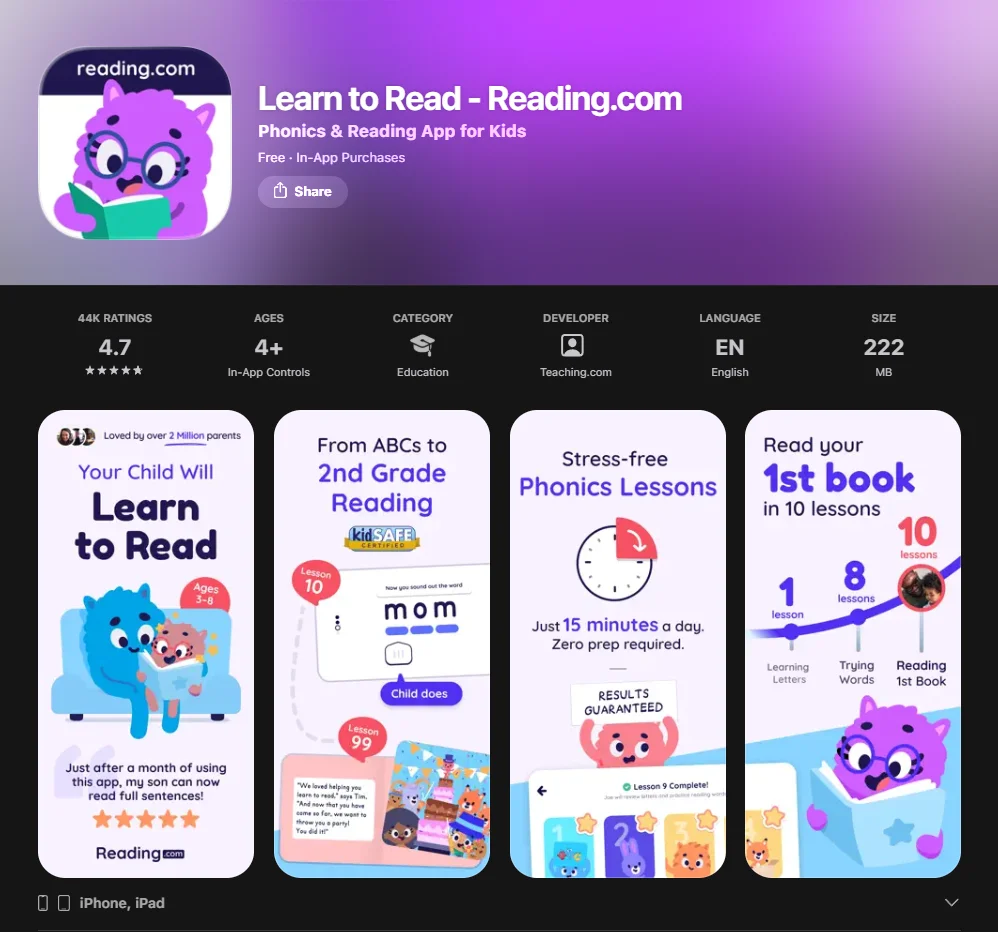
Reading.com is an educational app focused on teaching reading through systematic phonics instruction, based on the science of reading. Designed for young learners aged 3–8, it functions as a full reading program that takes kids from recognizing letters and sounds all the way to confident, effective literacy and basic comprehension.
The app draws on research-backed methods, combining synthetic phonics with engaging, structured lessons. Unlike general learning platforms that cover subjects like math and science, Reading.com stays tightly focused on teaching early readers to decode and comprehend text through a carefully sequenced curriculum.
It’s worth clarifying how Reading.com fits among similar-sounding products. Reading.com shares a similar space with products like Reading Eggs and Teach Your Monster to Read, but each of these platforms has its own approach and format. Programs like Teach Your Monster to Read, Hooked on Phonics, and Read in 100 Easy Lessons occupy the same general space but differ significantly in format and instruction model. Reading.com is its own standalone reading app with a distinct instruction model to teaching reading that leans on synthetic phonics rather than a mixed-methods approach.
The platform describes itself as a comprehensive reading hub — a single destination where children and their supporters can manage the entire early literacy journey without switching between different resources.
Features of This Reading Program
| Feature | Details |
| Phonics lessons | Systematic, sequential phonics instruction |
| Decodable digital books | Matched to each learner’s current level |
| Reading games | Reinforce phonics skills through play |
| Progress tracking | Parents monitor the full learning journey |
| 7-day free trial | Complete access before committing |
| Multi-child profiles | Ideal for families with more than one kid |
| Parent dashboard | Detailed session reports and skill tracking |
Key features in more detail:
- Interactive phonics lessons aligned with the science of reading and structured to build systematically on prior knowledge
- Decodable digital books that allow kids to apply phonics skills in real contexts, rather than just drills
- Reading games designed to build fluency and letter-sound recognition in an engaging format
- Adaptive pacing — the platform adjusts the difficulty based on the learner’s progress, but it doesn’t use a sophisticated AI system for adaptation. The difficulty level adjusts based on the completion of previous lessons
- Parent dashboard with session-by-session data, making it easy to spot where a student needs extra support
- Offline mode on some devices, allowing lessons to continue without an internet connection
How Does Reading.com Help Teaching Children to Read?
Reading.com uses a synthetic phonics approach, starting with individual letter sounds and teaching young learners to blend them into words. This is the same foundational method recommended by the science of reading, and research shows that children who are taught using systematic phonics develop decoding skills more quickly and reliably than those taught through whole-language methods.
Research suggests that systematic phonics instruction may be more effective than mixed-methods approaches, especially for students in the early stages of formal literacy instruction.
The platform structures learning in short, focused sessions of around 10–15 minutes — well suited to young attention spans. Learners move through phonics principles step by step: beginning with simple consonant-vowel patterns, progressing through blends and digraphs, and eventually reaching more advanced phonics. Decodable digital books give kids the chance to practice word decoding in authentic contexts rather than isolated exercises — which is critical for building genuine fluency.
One feature parents frequently mention is how self-directed the experience feels. Once a session is set up, young learners can navigate the lessons largely on their own, with clear audio instructions guiding them through each activity. This makes the program especially useful for busy households.
The app also reinforces learning between sessions through short review activities that revisit recently taught phonics skills — aligning with the well-documented principle of spaced repetition for long-term retention.
Is Reading.com Safe for Kids?
Yes — and this is one area where the platform stands out clearly. The experience is built from the ground up and is designed for children aged 3–8:
- No ads — the interface is completely ad-free at every level
- No in-app purchases accessible within the student-facing interface
- The platform follows privacy and security guidelines, but specific mentions of COPPA compliance are only found in the privacy policy, not in the app store descriptions
- No social features, chat functions, or external links visible to learners
- Content is fully age-appropriate and editorially reviewed for the 3–8 range
- Parent area is password-protected and separate from the student experience
Parents remain in full control. The parent dashboard requires a separate login, preventing young users from accessing account settings, billing information, or content outside their assigned lessons.
Key Benefits of Using Reading.com for Kids
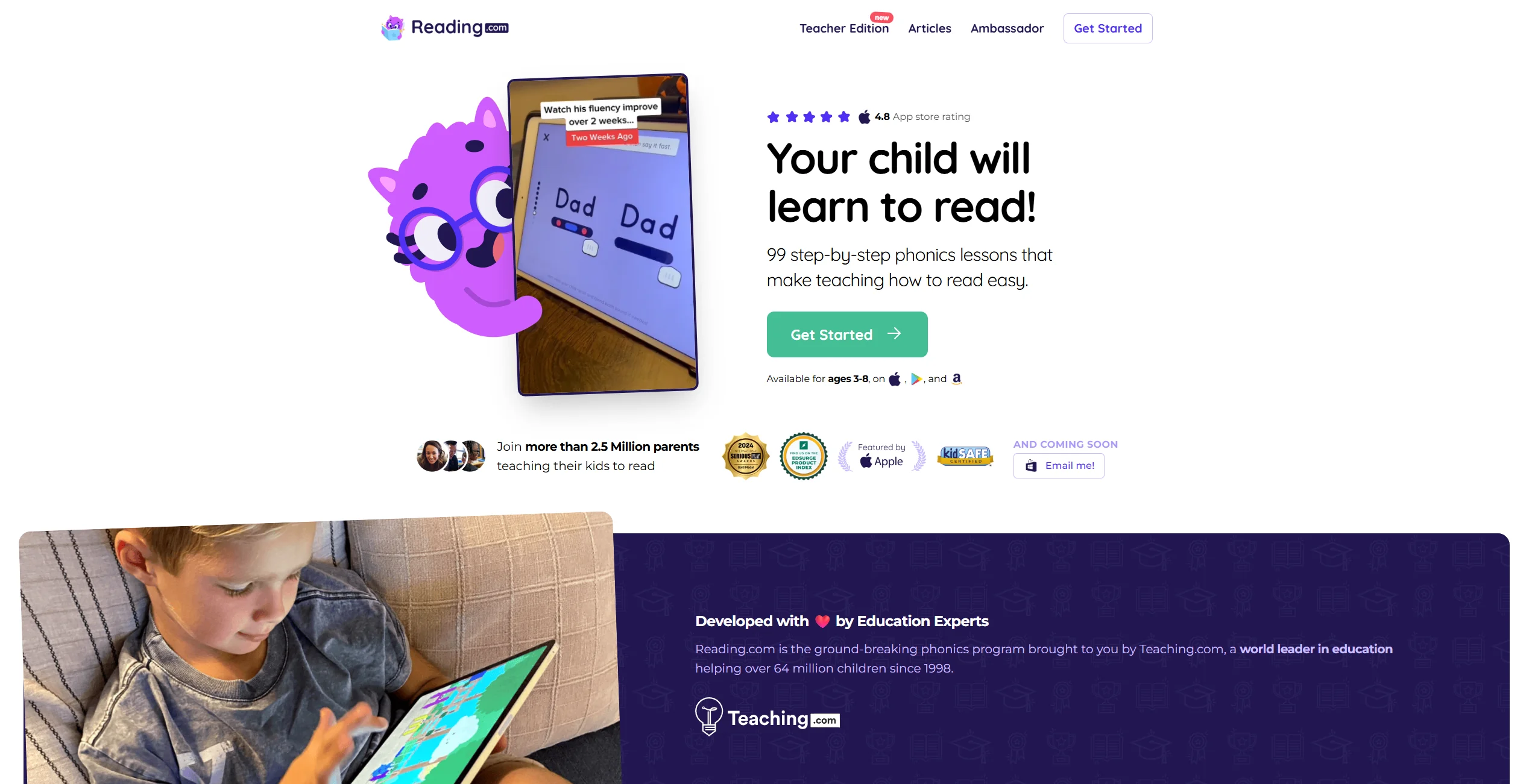
Phonics-Based Learning: Why It’s Great for Kids
The science of reading has made one thing increasingly clear: explicit, systematic phonics instruction is foundational to early literacy. Students who receive structured phonics lessons tend to develop fluency faster and retain decoding skills longer than peers taught through other methods.
This isn’t a fringe view. Research suggests that a focus on phonics — particularly the synthetic phonics approach used by Reading.com — may lead to better outcomes for beginning readers. Research shows that children who build solid phonics foundations in early literacy are significantly better equipped for comprehension skills later on.
Reading.com’s curriculum is based entirely on these phonics principles. Lessons are sequential and cumulative, meaning each new concept builds directly on what came before. A kid who is still consolidating basic blending skills won’t be pushed into comprehension work before they’re ready. This careful sequencing makes the app particularly well-suited for beginners and for young learners who need more time and repetition to develop foundational phonics skills.
For parents who have compared options like Hooked on Phonics or child to read in 100 easy lessons programs — Reading.com sits firmly in the same evidence-based tradition, with a digital-first delivery that many families find more accessible and flexible.
Interactive and Engaging Learning Experience
A common concern among parents considering any reading app is straightforward: will my kid actually use it? Engagement is everything with young learners, and an app that feels like a chore won’t get opened.
Reading.com addresses this thoughtfully. The interface features colorful animated characters, short reward sequences after completed activities, and literacy games that reinforce phonics skills without feeling repetitive. The tone throughout is warm and encouraging — when a student makes a mistake, the response is gentle redirection rather than a discouraging failure sound.
Sessions are structured to feel varied. A typical lesson might move through a phonics introduction, a word-building activity, a short decodable book, and a comprehension question — enough variety to hold attention without overwhelming a young learner. Many parents report that kids using the app ask to do their lessons rather than needing to be reminded. That’s perhaps the most practical endorsement any reading app for kids can receive.
The platform is also accessible: it works across devices, requires no printing or physical materials, and children can learn from an app at home, on the go, or as part of a structured homeschool day.
Personalized Learning Path for Each Child
Not every kid develops literacy skills at the same pace, and a good reading program needs to account for that reality. Reading.com tracks which phonics skills each learner has mastered and adjusts the difficulty and pacing of lessons accordingly. If a student moves quickly through early phonics concepts, the platform advances them without waiting for arbitrary time milestones. If they need more practice, additional exercises are provided before moving on.
This adaptive approach matters because frustration is one of the most common barriers in early literacy instruction. When a program moves too fast, students disengage. When it moves too slowly, more advanced learners lose interest. Reading.com’s model attempts to keep each learner appropriately challenged throughout their child’s learning journey.
The program is also designed to help your child learn at their natural pace — which means two siblings using the same account will follow entirely separate paths based on their individual progress. Parents who want to actively guide their children through early literacy will find the dashboard gives them enough visibility to do that confidently.
Limitations of Reading.com
No app is a perfect fit for every family, and an honest review of the reading.com app needs to address where the platform has boundaries alongside where it excels.
Screen Time Considerations
Any digital learning tool raises legitimate questions about screen time, especially for the youngest users. The American Academy of Pediatrics recommends limiting recreational screen time for kids aged 2–5 to one hour per day, and for ages 6 and up, ensuring that screen use doesn’t displace sleep, physical activity, or face-to-face interaction.
The good news is that Reading.com’s session design works in parents’ favor here. Lessons are short — typically 10–15 minutes — and the platform doesn’t use autoplay, push notifications directed at children, or infinite-scroll mechanics. When a session ends, it ends clearly. That said, parents should still count app time toward their family’s total daily screen exposure. Using the platform as a focused, time-limited daily activity aligns best with both its design and broader pediatric guidance.
Limited Advanced Learning Features
Reading.com is excellent for early literacy — but it is explicitly designed for the 3–8 age range and for learners at the beginning of their journey. Students who have already mastered foundational phonics and are reading independently at a second-grade level or above will likely find the content too easy within a few months of use.
The platform’s decodable digital book library, while well-matched to beginning readers, doesn’t extend into rich chapter-book content or complex comprehension questions that older or more advanced students need. For those learners, a platform with more extensive digital books and higher-level work — or a dedicated program for improving their literacy skills at an advanced level — would be a better long-term fit.
This isn’t a flaw so much as a clear boundary of what the app is designed to do. Parents should see it as a strong starting tool, with the expectation that their child’s literacy will eventually outgrow it as their skills develop.
How Safe is Reading.com for Kids
Data Privacy and Security Measures
Reading.com collects minimal data from student profiles and operates in full compliance with COPPA (Children’s Online Privacy Protection Act). Account registration and all personal information are held in the parent account; student profiles contain no personally identifying data.
The platform does not sell user data to third parties and does not use student activity data for advertising purposes. Parents can request a full export or deletion of their account data at any time through account settings. For families who take data privacy seriously, this level of transparency compares favorably to many competing educational apps that are far less explicit about their practices.
Reading.com does not require children to create any kind of public-facing profile or username visible to other users. The experience is entirely private and contained within the family’s account.
Ad-Free Environment for Kids
There are zero ads in the student-facing experience — no banner ads, no video ads between lessons, no sponsored content of any kind. This is particularly important for the core 3–6 age group, as developmental research shows that young children often cannot reliably distinguish between advertising and editorial content, making an ad-free environment especially valuable at this stage.
The absence of advertising also keeps the interface clean and focused. There are no distracting pop-ups, no prompts to watch a sponsored video, and no visual noise competing with the phonics lessons themselves.
Reviews and Recommendations

Positive Feedback from Parents
Reviews of the Reading.com app on the App Store and Google Play are broadly positive, with consistent praise for the phonics instruction quality and the platform’s child-friendly design.
“My 5-year-old went from not knowing her letters to sounding out simple words in about a month. We use it every morning for 15 minutes and it’s become part of our routine.” — App Store review
“We tried a few other literacy apps before this one. Reading.com is the only one where my son actually asks to do his lesson without being told.” — Google Play review
Common themes across positive feedback include:
- Noticeable improvement in phonics skills within 4–6 weeks of consistent daily use
- Young learners initiating sessions on their own without parental prompting
- Clean, focused design that parents find easy to set up and monitor
- Transparent progress tracking that makes it easy to see what a student has covered
- Parents noting it feels like a complete program in an app rather than a collection of disconnected mini-games
Educator Insights: How Reading.com Fits in Classroom Settings
Reading.com is increasingly used as a supplementary tool in homeschool environments and as a take-home recommendation from classroom teachers. Because its instruction model aligns with the science of reading — the same evidence-based framework now reflected in updated literacy standards across many US states and in the UK’s phonics screening check — the platform complements what many children are already learning at school rather than contradicting it.
Educators who recommend the app tend to position it as a structured practice tool for home use, not a replacement for direct classroom instruction. Children and adults working together through early literacy still benefit from shared time, discussion, and real-time feedback that an app cannot fully replicate. What Reading.com does well is provide consistent, well-sequenced phonics practice that reinforces classroom learning — in a format that kids engage with willingly.
Teachers in homeschool settings have noted that the parent dashboard gives enough visibility into each child’s current literacy level and progress to use Reading.com as a genuine curriculum component, rather than just a supplementary game. The platform’s structured approach to lessons makes it easier to track where a student is ready to learn independently and where they still need support.
Does Reading.com Have Any Major Drawbacks?
Based on aggregated user feedback and a structural review of the platform, the most consistent criticisms are:
- Age ceiling — the program works best for kids aged 3–7; older students with existing phonics knowledge will advance through the content quickly
- Subscription pricing — after the 7-days free trial, the subscription costs around $12.49/month or $74.99/year in the US, which is significantly cheaper than private tutoring, though prices may vary by region
- Book library depth — the decodable digital book selection is appropriate for the target age range but less extensive than dedicated digital library platforms
- Internet dependency — while some offline functionality exists, the full experience requires a stable connection
None of these are reasons to avoid the platform for families with young, beginning readers. They are, however, worth factoring into a decision — particularly around cost and how long the subscription will remain useful as a child’s literacy level advances.
Conclusion: Should You Use Reading.com for Your Kids?
Is It Worth the Investment?
For families with young learners aged 3–7 who are at the start of their literacy journey, Reading.com offers strong, defensible value. The phonics instruction is research-aligned, the design is appropriate for early readers, and the safety features are among the most thorough available in the educational app space.
Reading.com offers a 7-day free trial — enough time to run a genuine test with your child before committing financially. The availability of a 30-day free trial depends on third-party promotions, which are not a standard option. The official free trial period is 7 days.
Compared to hiring a specialist or purchasing a comprehensive boxed literacy program, the subscription is significantly more affordable. Compared to free phonics apps, the instruction quality and curriculum depth are meaningfully higher. For most families in the target demographic, the value is clear.
Who Should Consider Using Reading.com?
The platform is a strong fit for:
- Parents of kids aged 3–7 at the very beginning of their literacy journey who want a structured, phonics-based online reading program
- Homeschooling families looking for a curriculum that covers the full arc from letters and sounds to confident, independent reading
- Classroom teachers who want a home-practice tool that reinforces phonics instruction already happening at school
- Families learning English as an additional language, where a systematic, sound-first approach helps children to learn to read without relying on sight-word memorization
- Busy parents who need a self-directed learning tool their child can use with minimal supervision — and who want one place to help your child learn, track progress, and guide their children’s early literacy development
It is probably not the best primary tool for students who are already reading chapter books independently, or for older struggling readers who may need a more targeted, diagnostic intervention to improve their reading skills beyond the foundational level.
Final Thoughts on Safety and Learning Benefits
Reading.com is one of the more carefully considered literacy apps currently available. Its commitment to phonics instruction grounded in the science of reading, its genuinely ad-free and privacy-respecting environment, and its design that is built for children aged 3–8 combine to make it a trustworthy option for early literacy development.
No app replaces the value of sitting beside your kid with a good book. But as a structured, daily phonics practice tool that young learners actually want to open — and that parents can monitor with confidence — Reading.com makes a strong case for itself. Whether you’re exploring the best reading programs for kids, comparing reading programs, or simply looking for a well-designed reading app that actually works, the 7-day free trial is a low-risk place to find out if it’s the right fit.
The blog, free and available to everyone on the Reading.com website, also provides additional guidance for parents on supporting early literacy at home — making the platform useful even beyond the app itself.