Best Free Online Games for 6-Year-Olds: Safe and Educational Picks

 Discover a Free Education Video App for Kids
Pastory uses AI to personalize educational video content based on your child’s interests and personality. Safe, engaging, and built for curious young minds. Sign up now to stay updated and enjoy early access with a free trial

Finding free online games for 6 year olds that are genuinely safe, age-appropriate, and actually support learning can feel like searching for a needle in a haystack. Most platforms either bury educational content under intrusive ads or offer entertainment with little developmental value. This guide cuts through the noise with curated, browser-based picks organized by subject and skill — along with honest guidance on what to look for, what to avoid, and how to fit screen time into a healthy routine for your first grader.
Key Takeaways
- The strongest free online games for 6-year-olds combine genuine curriculum alignment with engaging mechanics — they feel like play, not homework.
- Platforms such as ABCya, PBS Kids, Funbrain, Starfall, and Arcademics offer browser-based games with no download and no sign-up required for most content.
- Safety features matter as much as educational value: look for no in-app purchases, minimal or no ads, and no open chat functions.
- The American Academy of Pediatrics recommends consistent limits on recreational screen time and encourages co-engagement, especially for children under 8.
- Online games work best as one part of a broader learning routine that includes offline play, reading, and caregiver interaction.
What 6-Year-Olds Are Actually Learning Right Now
Understanding what first graders are working on academically and developmentally helps you choose games that genuinely reinforce school-based skills rather than simply filling time. At age 6, most children are building phonics knowledge and working toward reading 100 or more sight words fluently. In math, the focus is on addition and subtraction within 20, counting, number sense, and beginning work with shapes and telling time. Cognitively, 6-year-olds are developing sustained attention, early logical reasoning, cause-and-effect thinking, and the ability to follow multi-step instructions — all skills that well-designed games can meaningfully support.
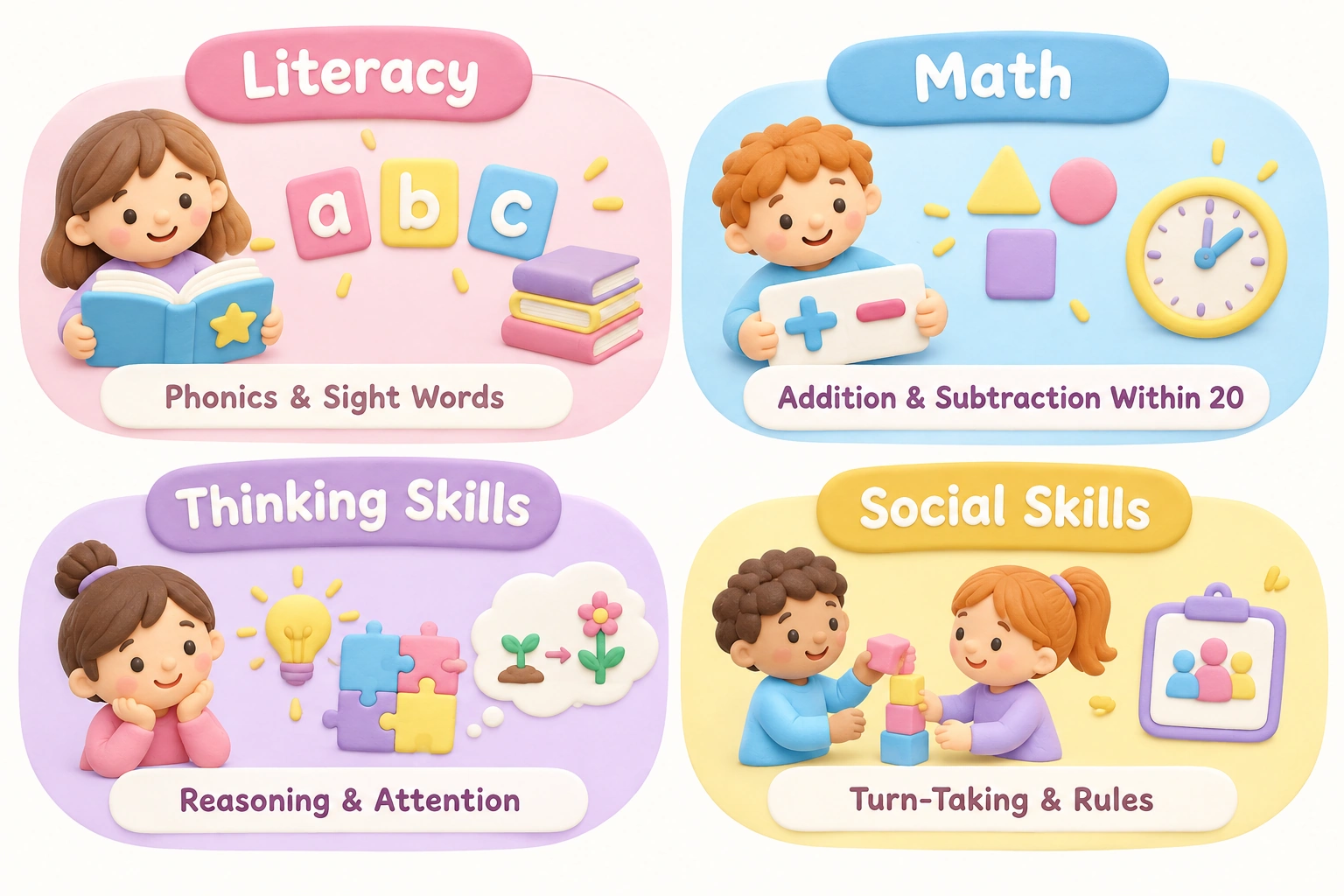
Socially and emotionally, children this age are beginning to understand rules, take turns, and manage mild frustration — which makes structured game formats with clear feedback loops particularly well-suited to this stage. Games that offer immediate, encouraging feedback without punishing mistakes tend to hold attention longer and support a growth mindset. When evaluating any platform, it helps to ask whether the game’s mechanics actually match these developmental realities or simply use a child-friendly visual skin over content that is too easy, too hard, or developmentally misaligned.
How to Evaluate Free Online Games for Kids This Age
Not all free games are created equal, and the word “educational” on a website does not guarantee developmental value. Before bookmarking a platform for your child, consider the following practical criteria.
- No download, no sign-up: The best browser-based games for 6-year-olds require neither an app installation nor an account. This protects your child’s data and removes friction for parents.
- Ad experience: Truly ad-free platforms are rare among free services. Some platforms show banner ads only; others use autoplay video ads or redirect children to external sites. Know the difference before handing over the device.
- No in-app purchases: A game that is free to start but prompts children to unlock content through purchases is not genuinely free and can create conflict.
- Content alignment: Does the game actually target first grade skills — phonics and sight words, addition and subtraction, vocabulary — or is it loosely labeled “educational” without curriculum grounding?
- Cognitive engagement level: Games that require active decision-making, problem-solving, or reasoning tend to support cognitive development more than passive clicking or watching animations.
- Device compatibility: Check whether the game runs on your family’s actual device. Some browser-based games rely on Flash (now discontinued) or require a desktop browser; others work well on tablets and Chromebooks.
Best Free Platforms for Math and Reading Games
The platforms below are consistently recommended by educators and parents for their curriculum alignment, child-safe environments, and accessible free tiers. Each has been selected based on its suitability for 6-year-olds specifically, not just a broad “kids” age range.
ABCya
ABCya is one of the most widely used educational game platforms in US elementary classrooms. Its games are organized by grade level, making it straightforward to find content aligned with first grade skills. Math games cover addition, subtraction, counting, and number patterns; literacy games address phonics, sight words, spelling, and reading fluency. Most games are browser-based and require no sign-up for basic access. The free version does include ads, though they are generally banner-style rather than intrusive video ads. ABCya works on most desktop browsers and many tablets, though some older games may have limited mobile compatibility.
PBS Kids
PBS Kids offers a child-safe environment built around its well-known characters — Curious George, Daniel Tiger, Wild Kratts, and others. Games are tied to the educational themes of each show, covering early math, science concepts, social-emotional skills, and vocabulary. The platform is genuinely ad-free for children and requires no account to play most games. PBS Kids games tend to be gentler in pacing, making them particularly well-suited to children on the younger end of the 6-year-old range or those who find faster-paced games frustrating. The platform works on desktop browsers, tablets, and through its dedicated app.
Funbrain
Funbrain has been a classroom staple for decades and offers a mix of math games, reading activities, and interactive books. Its math arcade-style games are especially popular for reinforcing addition and subtraction facts in an engaging format. Funbrain also hosts a library of early chapter books and comics that can support independent reading at the first grade level. The free version is ad-supported, but the educational content is solid and curriculum-aligned. Teachers frequently recommend Funbrain for at-home practice because its content mirrors what children encounter in school.
Starfall
Starfall is particularly strong for phonics and early reading. Its systematic approach to letter sounds, blending, and sight words mirrors structured literacy instruction, which aligns well with how most schools now teach reading. The free tier offers a meaningful selection of phonics games and early reading activities with no sign-up required. A paid subscription unlocks additional content, but the free version is genuinely useful for 6-year-olds who are consolidating early reading skills. Starfall’s interface is simple and low-distraction, which suits children who are easily overwhelmed by busy visual environments.
Arcademics
Arcademics specializes in math and language arts games with a multiplayer racing format that many children find highly motivating. Players compete against others (or computer opponents) in real time to answer math facts, spelling questions, or vocabulary challenges. For 6-year-olds, the addition and subtraction games are particularly well-matched to first grade curriculum goals. The multiplayer element introduces a social dimension, though parents should be aware that playing against unknown users online carries some risk; the platform does not include open chat, which reduces but does not eliminate this concern. Most Arcademics games are browser-based and require no download.
Math Playground
Math Playground offers a wide range of math games, logic puzzles, and word problems organized by grade level. For 6-year-olds, the number sense, addition, and basic geometry games are most relevant. The platform also includes thinking games that develop spatial reasoning and problem-solving — skills that support broader cognitive development beyond arithmetic. Math Playground is browser-based, works on most devices including Chromebooks, and the free version is accessible without an account. Some sections of the site include ads, so parental supervision during initial sessions is advisable.
National Geographic Kids
National Geographic Kids is an excellent choice for children who are curious about animals, science, and the natural world. While it is not a dedicated math or reading platform, its games, videos, and interactive content build vocabulary, science knowledge, and geographic awareness in an engaging format. The platform is generally child-safe and ad-light compared to many free sites. For 6-year-olds with strong interests in animals or nature, National Geographic Kids can provide meaningful learning that complements school-based literacy and math practice.
Platform Comparison: Ads, Sign-Up, and Device Compatibility
| Platform | Subjects Covered | Ad Experience | Sign-Up Required | Works on Tablet/Chromebook |
|---|---|---|---|---|
| ABCya | Math, literacy, logic | Banner ads (free tier) | No | Mostly yes |
| PBS Kids | Math, science, social-emotional | Ad-free | No | Yes |
| Funbrain | Math, reading, books | Ad-supported | No | Yes |
| Starfall | Phonics, reading, early math | Minimal (free tier) | No | Yes |
| Arcademics | Math facts, spelling, vocabulary | Some ads | No (optional) | Yes |
| Math Playground | Math, logic, spatial reasoning | Some ads | No | Yes (Chromebook-friendly) |
| National Geographic Kids | Science, animals, geography | Minimal | No | Yes |
Logic, Puzzle, and Creative Games Worth Exploring
Math and reading games address core academic skills, but cognitive development at age 6 also benefits from games that build reasoning, visual memory, spatial thinking, and creativity. The following types of games complement subject-specific practice and can support broader problem-solving abilities.
Puzzle and logic games — including tangram challenges, jigsaw puzzles, and pattern-matching activities — develop spatial reasoning and visualization skills. Platforms such as Math Playground and Hooda Math include logic game sections that go beyond arithmetic and encourage children to plan ahead and think through consequences before acting. These games tend to require sustained attention and can be particularly engaging for children who find straightforward drill-style math games repetitive.
Memory and matching games — such as classic card-flip memory match formats — support visual memory and visual attention, both of which are foundational to reading and learning. Many free platforms include simple memory games that 6-year-olds can play independently. These are also good options for mixed-age siblings, since the mechanics are accessible to younger children while still engaging for older ones.
Creative and building games — including digital coloring, simple animation tools, and introductory coding activities — support fine motor skills (on touchscreen devices), creative thinking, and early computational reasoning. ScratchJr, available as a free app, introduces basic programming concepts through visual block coding in a format designed specifically for children aged 5 to 7. While it requires an app download rather than browser play, it is genuinely ad-free and contains no in-app purchases, making it one of the cleaner options in this category.
Safe Online Games for Kids: What Parents Should Watch For
Safety in the context of free online games for kids involves more than blocking inappropriate content. For 6-year-olds specifically, the key risks are subtler: exposure to manipulative advertising, accidental navigation to external sites, open chat with strangers, and the gradual normalization of in-app purchase prompts. Understanding these risks helps parents make more informed choices rather than simply avoiding all online games.
Open chat functions are the most significant safety concern on gaming platforms for this age group. Platforms that allow children to communicate with unknown users in real time — even through pre-set phrases — carry risks that are difficult to monitor without active parental supervision. For 6-year-olds, it is generally advisable to choose platforms with no chat functionality or with strictly moderated, closed communication systems. Animal Jam, for example, is a popular virtual world for children that includes social features; while it has moderation systems in place, parents should review its privacy settings and chat options before allowing independent use.
Parental controls at the device level add an important layer of protection. Tools such as Google Family Link and Apple Screen Time allow parents to set time limits, approve app downloads, and restrict browser access to specific sites. These tools work alongside — not instead of — thoughtful platform selection. Internet safety organizations recommend that children aged 6 to 10 use the internet in shared family spaces rather than in private, and that parents periodically review browsing history and game activity.
Screen Time Guidance for 6-Year-Olds
The American Academy of Pediatrics recommends that parents of school-age children prioritize consistent limits on recreational screen time and ensure that digital activities do not displace sleep, physical activity, homework, or face-to-face interaction. For children aged 6 and older, the AAP does not specify a single daily hour limit but emphasizes quality of content and context of use over raw time totals. Educational games used with a clear purpose and time boundary are generally considered more beneficial than open-ended entertainment browsing.
Co-engagement — sitting with your child during game sessions, asking questions about what they are doing, and connecting game content to real-world experiences — significantly increases the developmental value of screen time at this age. A 20-minute session of math and reading games played alongside a caregiver who asks follow-up questions is likely to be more beneficial than an hour of independent play on the same platform. This does not mean parents need to supervise every minute, but periodic involvement makes a meaningful difference, particularly for children who are just beginning to use online platforms independently.

A practical approach for families is to designate specific times for educational game play — after school homework, for example, or as a weekend morning activity — rather than allowing open-ended access. Setting a visible timer that the child can see helps 6-year-olds manage transitions away from screens, which can otherwise be a source of conflict.
Games That Work for Mixed-Age Siblings
If your household includes children of different ages, finding games that work across a range can reduce conflict and make shared screen time more manageable. Several platforms and game types are naturally flexible in this regard. PBS Kids games are accessible to children as young as 3 or 4, meaning a 6-year-old and a younger sibling can often play together with the older child taking a guiding role — which itself supports language development and social skills. Memory match games and simple jigsaw puzzles are similarly accessible across a wide age range.
For households with an older sibling aged 8 to 11, Arcademics multiplayer games can work well because the competitive format scales naturally — older children will be faster, but younger children can still participate meaningfully. Math Playground’s logic game section also spans a wide difficulty range, making it possible for siblings to play different games on the same platform without one child feeling excluded.
A Note on Offline and Low-Connectivity Alternatives
Not every family has reliable high-speed internet, and browser-based games can be frustrating on slow or intermittent connections. For families in this situation, downloadable apps that function offline are worth considering. Khan Academy Kids is a free app (available on iOS and Android) that covers early literacy and math for children aged 2 to 8 and works fully offline once downloaded. It is genuinely ad-free, contains no in-app purchases, and does not require an ongoing internet connection to access its core content. ScratchJr, mentioned earlier, also functions offline after installation. These options provide a meaningful alternative when browser-based play is not practical.
Which Platforms Do Teachers Recommend?
Several of the platforms listed in this guide are not just parent favorites — they are actively used in first grade classrooms. ABCya and Funbrain are among the most commonly assigned by elementary teachers for at-home practice because their content directly mirrors classroom curriculum. Arcademics is frequently used in schools for timed math fact practice, and Starfall is a common recommendation from reading specialists for children who need additional phonics reinforcement. If your child’s teacher has recommended a specific platform, that alignment between school and home practice can meaningfully reinforce learning — children benefit from encountering the same skills in multiple contexts.
Frequently Asked Questions
Are these games really free, or do they require a paid subscription?
Most platforms listed here offer a genuinely free tier that provides meaningful access to educational content without requiring payment. Some, such as Starfall and ABCya, offer paid subscriptions that unlock additional content or remove ads, but the free versions are functional and educationally useful for 6-year-olds. Always check the specific platform’s current pricing, as free tiers can change over time.
Do any of these games require my child to create an account?
The majority of platforms recommended here — including ABCya, PBS Kids, Funbrain, Starfall, and Math Playground — allow children to play without creating an account. Arcademics offers optional accounts for tracking progress but does not require sign-up for basic play. Avoiding account creation for young children is generally advisable from both a privacy and a simplicity standpoint.
How do I know if a game is actually educational or just labeled that way?
Look for games that target specific, identifiable skills your child is working on in school — phonics and sight words, addition and subtraction within 20, number sense, or vocabulary. Games that require active decision-making and provide meaningful feedback on correct and incorrect answers tend to offer more genuine learning value than those that simply animate a character while the child watches. If you can identify the specific first grade skill a game is practicing, it is likely to have real educational value.
Is it safe for my 6-year-old to play online games independently?
The platforms recommended here are among the safer options available, but no online environment is entirely without risk for young children. For 6-year-olds, playing in a shared family space, using device-level parental controls, and periodically checking in on what your child is doing are all reasonable precautions. Platforms with no chat functionality and no external links are the safest choices for independent use at this age.
How much time should my 6-year-old spend on educational games each day?
The American Academy of Pediatrics does not set a specific daily limit for school-age children but recommends that screen time not displace sleep, physical activity, or in-person interaction. Many families find that 20 to 30 minutes of purposeful educational game play per day is a reasonable and sustainable amount. The quality of the content and the presence of a caregiver during sessions matters more than the precise number of minutes.
What if my child finds these games too easy or too hard?
Most of the platforms listed here organize content by grade level or difficulty, making it possible to adjust up or down. ABCya and Math Playground both allow you to select kindergarten or second grade content if first grade games are not the right fit. If your child consistently finds age-appropriate games frustrating or unengaging, it may be worth discussing their current skill level with their teacher to identify whether additional support or enrichment is needed.
Choosing the Right Free Online Games for Your 6-Year-Old
The best free online games for 6-year-olds are learning games that don’t feel like schoolwork — they engage children through clear goals, immediate feedback, and just enough challenge to maintain interest without causing frustration. Platforms such as PBS Kids, ABCya, Starfall, and Arcademics consistently meet this standard while remaining child-safe and accessible without downloads or account creation. The comparison table in this guide can help you match a platform to your child’s current academic focus and your family’s device setup.
No single platform will be the right fit for every child. A 6-year-old who is a confident early reader may find Starfall’s phonics games too simple but thrive on Arcademics’ vocabulary challenges. A child who is still consolidating basic addition may benefit more from ABCya’s structured math games than from Math Playground’s logic puzzles. Starting with one or two platforms and observing how your child engages — whether they are challenged, bored, or frustrated — is the most reliable way to find the right match. Combining a short daily session of educational game play with offline reading, physical activity, and caregiver conversation will give your child the most balanced and developmentally supportive experience overall.

Take a short quiz to find out what your everyday choices say about your parenting style
When your child is curious about something new, what’s your instinct?
Take a short quiz to find out what your everyday choices say about your parenting style
“Can I download this app?” What happens next?
Take a short quiz to find out what your everyday choices say about your parenting style
When it comes to rules at home, which sounds most like you?
Take a short quiz to find out what your everyday choices say about your parenting style
If you could give your child one life skill today, what would you pick?
Take a short quiz to find out what your everyday choices say about your parenting style
Your child gets to choose what to watch. What would your ideal setup look like?
Take a short quiz to find out what your everyday choices say about your parenting style
Pick your parenting superpower ✨